> ## Documentation Index
> Fetch the complete documentation index at: https://pigeonholeapp.co.uk/docs/llms.txt
> Use this file to discover all available pages before exploring further.
# Care Diary
> Turn on the care diary, choose what each room records, set the sleep-check reminder, and decide what families see.
The care diary is the daily record of a child's care — nappies, bottles, meals, sleeps, toilet visits, mood, medication and notes. Staff log it as the day goes on, in the app or on the web, and families can see it in the parent portal. This page covers the manager-side setup.
Open in app: [Settings → Care Diary](https://pigeonholeapp.co.uk/app/admin/settings/carediary). The care diary is switched on from the **Features** card on [Site Profile](/docs/onboarding/site-profile).
## Step 1: Switch the care diary on
The care diary is off until you turn it on.
1. Go to **Settings → Site Profile**.
2. In the **Features** card, turn on **Care Diary**.
3. Click **Save**.
**Care diary** then appears under **Register** in the sidebar for staff, and a **Care diary** button appears on the register.
Until the feature is on, the care diary settings page and everything under it stays hidden, and nothing appears in the parent portal.
## Step 2: Create a care diary profile
A **profile** decides what a room records and how often staff are reminded to check a sleeping child. Nothing can be logged until at least one profile exists.
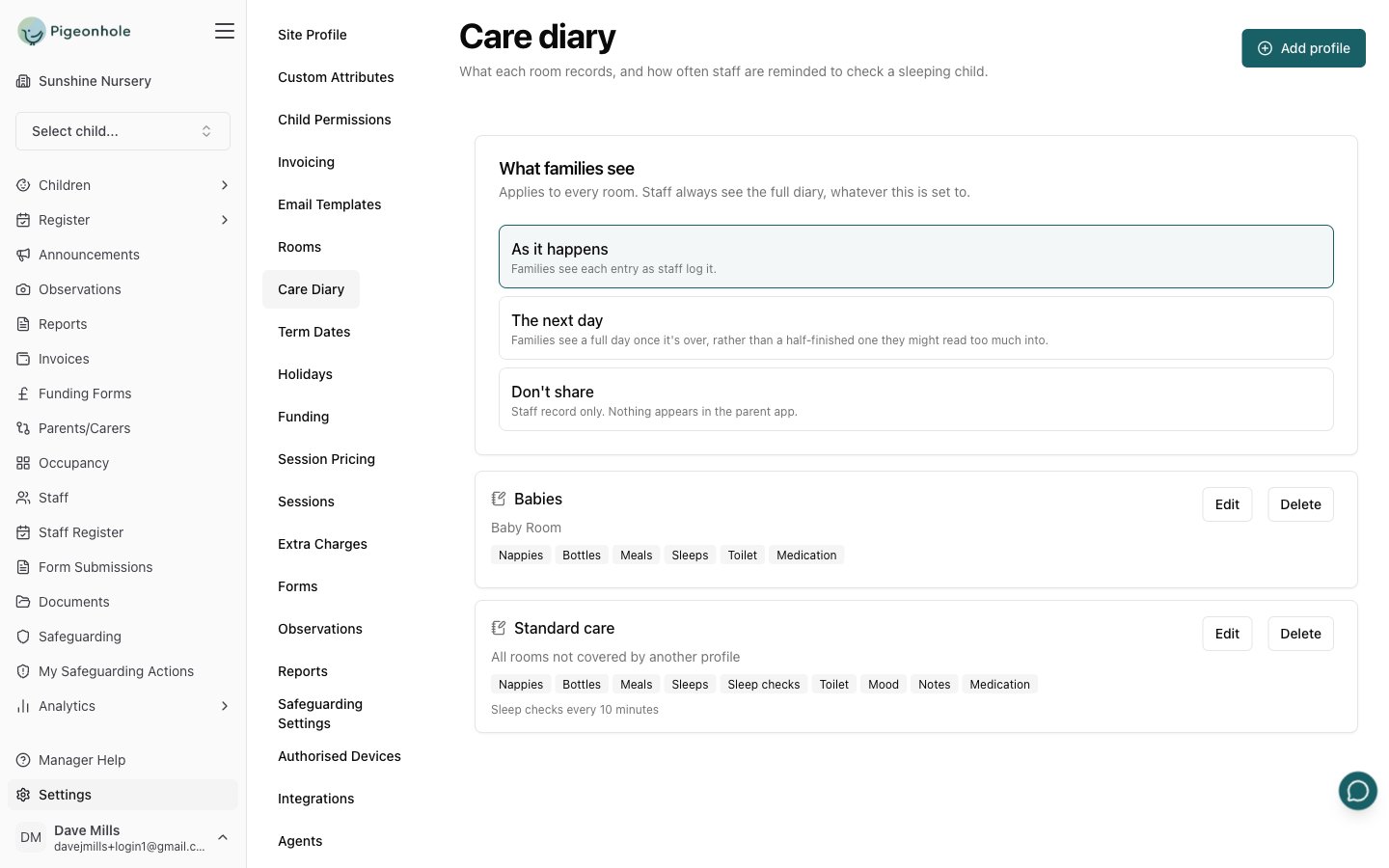 1. Go to **Settings → Care Diary**.
2. Click **Add profile**.
3. Give it a **Name** — staff never see this, so name it for yourself: "Babies", "Pre-school", "Standard care".
4. Choose which rooms it covers (see below).
5. Turn on the things this room records.
6. Set the sleep-check reminder.
7. Click **Save**.
1. Go to **Settings → Care Diary**.
2. Click **Add profile**.
3. Give it a **Name** — staff never see this, so name it for yourself: "Babies", "Pre-school", "Standard care".
4. Choose which rooms it covers (see below).
5. Turn on the things this room records.
6. Set the sleep-check reminder.
7. Click **Save**.
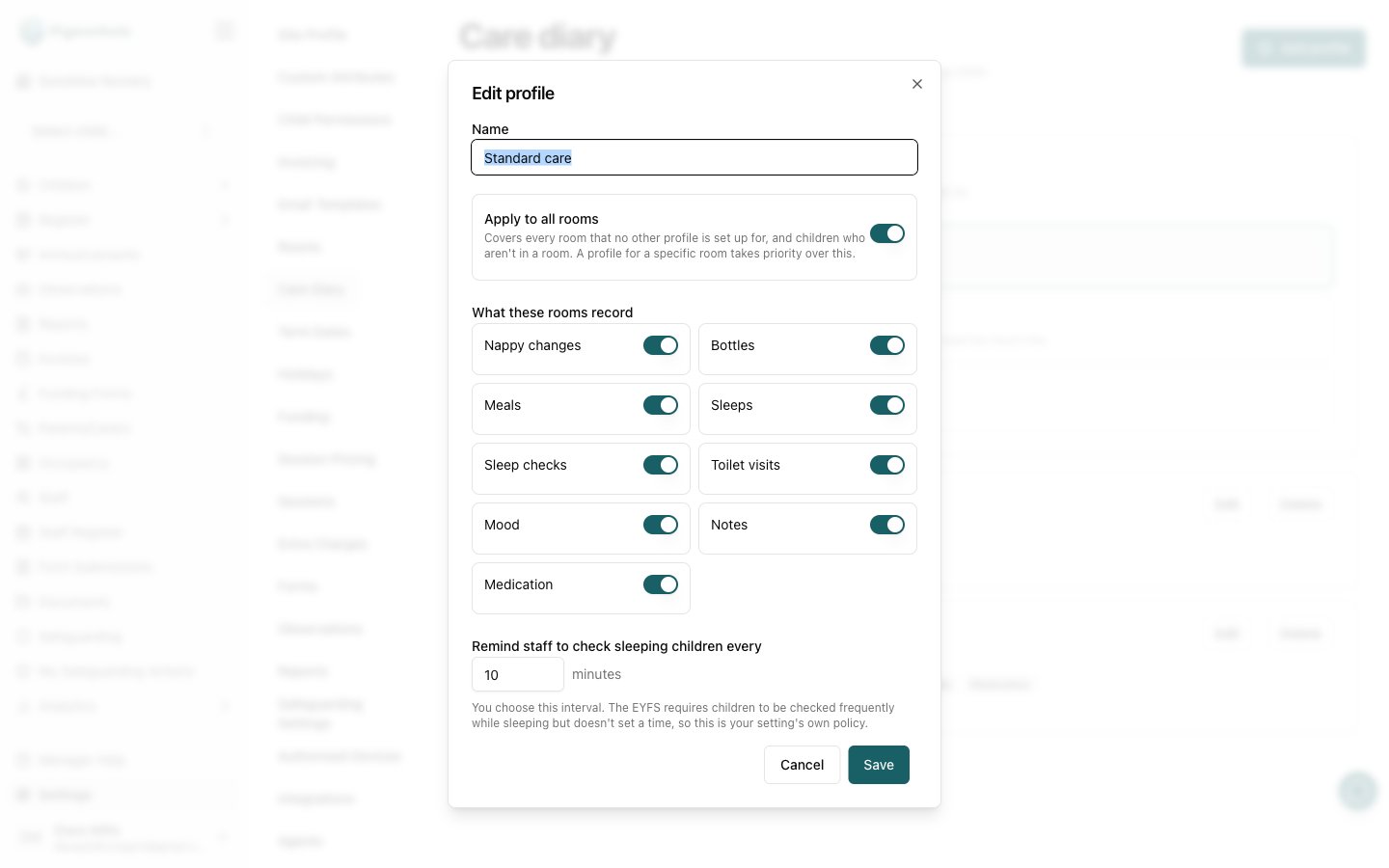 ### Which rooms a profile covers
Each profile either applies to specific rooms, or acts as the fallback:
* **Apply to all rooms on** — covers every room that no other profile is set up for, plus any children who aren't in a room.
* **Apply to all rooms off** — pick the rooms it covers from the list.
A profile naming a specific room **takes priority** over the all-rooms profile for that room. That lets you configure the diary once and refine it later: one "Standard care" profile covering everything, then a "Babies" profile for the baby room only.
This is also what makes the care diary usable at a setting with no rooms at all — the all-rooms profile covers those children.
### What these rooms record
Turn on only what the room actually records. Anything switched off never appears as an option for staff, so a pre-school room isn't offered bottles and a baby room isn't cluttered with things it never logs.
| Event | What staff record |
| - | - |
| **Nappy changes** | Wet, soiled, dry or wet & soiled, and whether cream was applied |
| **Bottles** | Volume in ml, from a set of one-tap sizes or a custom amount |
| **Meals** | What was served and how much was eaten |
| **Sleeps** | When a child went down, the position they were put down in, and when they woke |
| **Sleep checks** | A record that someone looked at the sleeping children, and that breathing was normal |
| **Toilet visits** | The same states as nappies, for children out of nappies |
| **Mood** | Happy, settled, sleepy, unsettled, upset or unwell |
| **Notes** | A free-text note. Staff only — never shown to families |
| **Medication** | What was given and the dose |
### The sleep-check reminder
**Remind staff to check sleeping children every** sets how often the app prompts for a safer-sleep check, in minutes.
The cadence belongs to the **room**, not to each child — staff check the sleep room, they don't walk in once per sleeping child. It runs from the earliest sleep still in progress, and every completed check moves it on. A child who joins an ongoing sleep slots into the existing rhythm, so nobody waits more than one interval for their first check.
The EYFS requires sleeping children to be checked frequently but doesn't set a time, so this interval is your setting's own policy. Ten minutes is a common choice.
If you turn **Sleep checks** off for a room, staff still see who is asleep and for how long — they just aren't prompted, and aren't offered a check.
## Step 3: Decide what families see
The **What families see** card at the top of the page applies to **every room**. There is one setting for the whole nursery.
| Option | What it means |
| - | - |
| **As it happens** | Families see each entry as staff log it. |
| **The next day** | Families see a full day once it's over, rather than a half-finished one they might read too much into. |
| **Don't share** | Staff record only. Nothing appears in the parent app. |
It starts on **Don't share** — sharing is opt-in, so nothing reaches families until you choose it.
This is deliberately one site-wide setting rather than one per room. A child can be in two rooms in a day, so a per-room rule has no answer to which room's setting wins.
Whatever this is set to, **staff always see the full diary**.
### What families never see
Some things are held back from the parent portal whatever you choose:
* **Notes** — staff shorthand written for handover, not a message to the family. Anything a family should be told belongs in a conversation at the door or an [announcement](/docs/managers/announcements).
* **Sleep checks** — an internal safeguarding record.
* **The position a child was put down in** — part of the safer-sleep record.
Families see the entry itself: what happened, when, and its detail — "Nappy change · Wet", "Meal · Shepherd's pie and peas — ate most", "Medication · Calpol — 5ml".
## Frequently Asked Questions
### Can different rooms record different things?
Yes. That's what profiles are for. Give each room a profile with only the events it records — a baby room with bottles and sleeps, a pre-school room with toilet visits and meals.
### What happens if a child is in two rooms in a day?
They appear in both rooms' grids, and staff in either room can log for them. What families see is a single site-wide setting, so it doesn't matter which room the care happened in.
### Can I delete a profile that's in use?
Yes, but the rooms it covered fall back to the all-rooms profile — or, if there isn't one, staff can't log anything for those rooms. Entries already recorded are never affected.
### Do I have to use the sleep-check reminder?
No. Turn **Sleep checks** off in the profile and staff simply see who is asleep, with no prompt.
### Who can change these settings?
Managers only. Staff see the care diary itself but not the settings page.
### Which rooms a profile covers
Each profile either applies to specific rooms, or acts as the fallback:
* **Apply to all rooms on** — covers every room that no other profile is set up for, plus any children who aren't in a room.
* **Apply to all rooms off** — pick the rooms it covers from the list.
A profile naming a specific room **takes priority** over the all-rooms profile for that room. That lets you configure the diary once and refine it later: one "Standard care" profile covering everything, then a "Babies" profile for the baby room only.
This is also what makes the care diary usable at a setting with no rooms at all — the all-rooms profile covers those children.
### What these rooms record
Turn on only what the room actually records. Anything switched off never appears as an option for staff, so a pre-school room isn't offered bottles and a baby room isn't cluttered with things it never logs.
| Event | What staff record |
| - | - |
| **Nappy changes** | Wet, soiled, dry or wet & soiled, and whether cream was applied |
| **Bottles** | Volume in ml, from a set of one-tap sizes or a custom amount |
| **Meals** | What was served and how much was eaten |
| **Sleeps** | When a child went down, the position they were put down in, and when they woke |
| **Sleep checks** | A record that someone looked at the sleeping children, and that breathing was normal |
| **Toilet visits** | The same states as nappies, for children out of nappies |
| **Mood** | Happy, settled, sleepy, unsettled, upset or unwell |
| **Notes** | A free-text note. Staff only — never shown to families |
| **Medication** | What was given and the dose |
### The sleep-check reminder
**Remind staff to check sleeping children every** sets how often the app prompts for a safer-sleep check, in minutes.
The cadence belongs to the **room**, not to each child — staff check the sleep room, they don't walk in once per sleeping child. It runs from the earliest sleep still in progress, and every completed check moves it on. A child who joins an ongoing sleep slots into the existing rhythm, so nobody waits more than one interval for their first check.
The EYFS requires sleeping children to be checked frequently but doesn't set a time, so this interval is your setting's own policy. Ten minutes is a common choice.
If you turn **Sleep checks** off for a room, staff still see who is asleep and for how long — they just aren't prompted, and aren't offered a check.
## Step 3: Decide what families see
The **What families see** card at the top of the page applies to **every room**. There is one setting for the whole nursery.
| Option | What it means |
| - | - |
| **As it happens** | Families see each entry as staff log it. |
| **The next day** | Families see a full day once it's over, rather than a half-finished one they might read too much into. |
| **Don't share** | Staff record only. Nothing appears in the parent app. |
It starts on **Don't share** — sharing is opt-in, so nothing reaches families until you choose it.
This is deliberately one site-wide setting rather than one per room. A child can be in two rooms in a day, so a per-room rule has no answer to which room's setting wins.
Whatever this is set to, **staff always see the full diary**.
### What families never see
Some things are held back from the parent portal whatever you choose:
* **Notes** — staff shorthand written for handover, not a message to the family. Anything a family should be told belongs in a conversation at the door or an [announcement](/docs/managers/announcements).
* **Sleep checks** — an internal safeguarding record.
* **The position a child was put down in** — part of the safer-sleep record.
Families see the entry itself: what happened, when, and its detail — "Nappy change · Wet", "Meal · Shepherd's pie and peas — ate most", "Medication · Calpol — 5ml".
## Frequently Asked Questions
### Can different rooms record different things?
Yes. That's what profiles are for. Give each room a profile with only the events it records — a baby room with bottles and sleeps, a pre-school room with toilet visits and meals.
### What happens if a child is in two rooms in a day?
They appear in both rooms' grids, and staff in either room can log for them. What families see is a single site-wide setting, so it doesn't matter which room the care happened in.
### Can I delete a profile that's in use?
Yes, but the rooms it covered fall back to the all-rooms profile — or, if there isn't one, staff can't log anything for those rooms. Entries already recorded are never affected.
### Do I have to use the sleep-check reminder?
No. Turn **Sleep checks** off in the profile and staff simply see who is asleep, with no prompt.
### Who can change these settings?
Managers only. Staff see the care diary itself but not the settings page.