> ## Documentation Index
> Fetch the complete documentation index at: https://pigeonholeapp.co.uk/docs/llms.txt
> Use this file to discover all available pages before exploring further.
# Child Invoicing
> Viewing invoices and configuring invoicing settings for a child.
# Child Invoicing
The Invoicing tab on a child's profile allows you to view all invoices generated for the child and configure child-specific invoicing settings. This tab is only visible to users with invoicing permissions.
The tab contains two sub-tabs: **Invoices** and **Settings**.
## Invoices
The Invoices sub-tab displays all invoices generated for this child.
* View a list of all invoices with status indicators (draft, sent, paid, overdue).
* Click an invoice to view its details or download the PDF.
* Invoices are listed in reverse chronological order.
## Settings
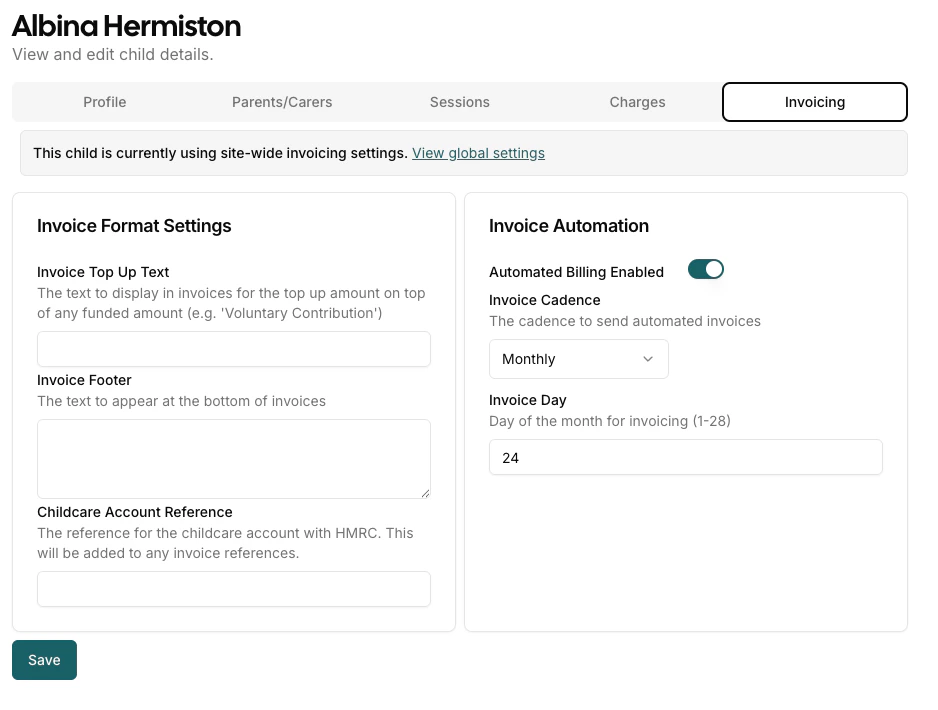
The Settings sub-tab allows you to configure invoice settings and automation for this child, overriding the globally configured settings. If the child is using site-wide invoicing settings, a notice will appear at the top of the tab.
### Invoice Format Settings
* **Invoice Top Up Text** — Enter custom text to display in invoices for any top-up amount above funded amounts (e.g., "Voluntary Contribution").
* **Invoice Footer** — Add text that will appear at the bottom of all invoices for this child. This can be used for notes, disclaimers, or additional information.
* **Childcare Account Reference** — Specify a reference for the childcare account with HMRC. This reference will be included in invoice references for easier tracking and compliance.
### Invoice Automation
* **Automated Billing Enabled** — Toggle this switch to enable or disable automated invoice generation for the child.
* **Invoice Cadence** — Select how often automated invoices should be sent (e.g., Monthly). Use the dropdown to choose the cadence.
* **Invoice Day** — Set the day of the month (1--28) when invoices should be generated, or for termly invoices the number of days before a term starts to invoice.
 ### Discount Assignment
One or more discounts can be assigned to a child from this Settings sub-tab. In the **Discounts** section, toggle on the discounts you want to apply. When multiple discounts are assigned, each is calculated independently and appears as a separate line item on generated invoices. See [Discounts](/managers/invoicing/discounts) for details on creating and managing discounts.
### Reverting Invoice Settings
To revert a child to use the globally configured settings, click the **Revert to Site Defaults** button.
Changes to invoicing settings only affect future invoices. Existing invoices are not retroactively updated.
### Discount Assignment
One or more discounts can be assigned to a child from this Settings sub-tab. In the **Discounts** section, toggle on the discounts you want to apply. When multiple discounts are assigned, each is calculated independently and appears as a separate line item on generated invoices. See [Discounts](/managers/invoicing/discounts) for details on creating and managing discounts.
### Reverting Invoice Settings
To revert a child to use the globally configured settings, click the **Revert to Site Defaults** button.
Changes to invoicing settings only affect future invoices. Existing invoices are not retroactively updated.