> ## Documentation Index
> Fetch the complete documentation index at: https://pigeonholeapp.co.uk/docs/llms.txt
> Use this file to discover all available pages before exploring further.
# Integration Errors
> Understanding and resolving accountancy sync errors on invoices.
When syncing an invoice to your accounting software (Xero, QuickBooks, etc.) fails, the error is captured and displayed on the invoice so you can investigate and resolve it.
## How Integration Errors Appear
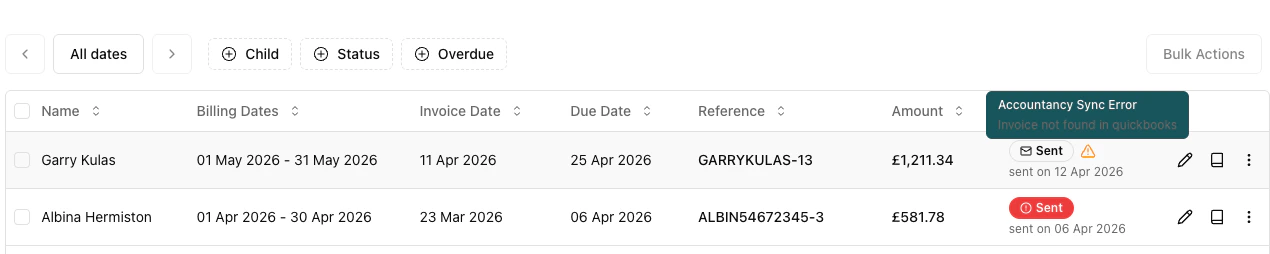
An amber alert triangle icon appears in the invoice table's **Status** column when a sync error has occurred. Hover over the icon to see a tooltip showing the error message — this gives you a quick view of what went wrong without opening the invoice.
 ## Viewing the Full Error
To see the complete error message, open the invoice by clicking **Edit** or **View** from the actions menu. The full integration error is displayed at the top of the invoice detail view.
## Resolving Errors
There are two options for resolving an integration error:
### Resync Invoice
Retries syncing the existing invoice to your accounting software. Use this when the error was temporary — for example, a network issue, API rate limit, or a brief outage in the accounting service.
1. Open the invoice actions menu.
2. Click **Resync Invoice**.
3. The system will attempt to sync the invoice again.
### Recreate Accounting Invoice
Unlinks the current accounting invoice and creates a brand new one in your accounting software. Use this when the accounting invoice is corrupted, has been manually deleted from the accounting system, or needs to be recreated from scratch.
1. Open the invoice actions menu.
2. Click **Recreate Accounting Invoice**.
3. Confirm the action in the dialog — this cannot be undone.
Recreating an accounting invoice will unlink the existing invoice in your accounting software. If the original invoice still exists in Xero or QuickBooks, you may need to void or delete it manually to avoid duplicates.
## When to Use Resync vs Recreate
| Scenario | Action |
| ----------------------------------------------- | --------------------------- |
| Temporary network or API error | Resync Invoice |
| Rate limit exceeded | Resync Invoice |
| Invoice deleted in accounting software | Recreate Accounting Invoice |
| Accounting invoice has incorrect data | Recreate Accounting Invoice |
| Persistent sync failures after multiple retries | Recreate Accounting Invoice |
## Viewing the Full Error
To see the complete error message, open the invoice by clicking **Edit** or **View** from the actions menu. The full integration error is displayed at the top of the invoice detail view.
## Resolving Errors
There are two options for resolving an integration error:
### Resync Invoice
Retries syncing the existing invoice to your accounting software. Use this when the error was temporary — for example, a network issue, API rate limit, or a brief outage in the accounting service.
1. Open the invoice actions menu.
2. Click **Resync Invoice**.
3. The system will attempt to sync the invoice again.
### Recreate Accounting Invoice
Unlinks the current accounting invoice and creates a brand new one in your accounting software. Use this when the accounting invoice is corrupted, has been manually deleted from the accounting system, or needs to be recreated from scratch.
1. Open the invoice actions menu.
2. Click **Recreate Accounting Invoice**.
3. Confirm the action in the dialog — this cannot be undone.
Recreating an accounting invoice will unlink the existing invoice in your accounting software. If the original invoice still exists in Xero or QuickBooks, you may need to void or delete it manually to avoid duplicates.
## When to Use Resync vs Recreate
| Scenario | Action |
| ----------------------------------------------- | --------------------------- |
| Temporary network or API error | Resync Invoice |
| Rate limit exceeded | Resync Invoice |
| Invoice deleted in accounting software | Recreate Accounting Invoice |
| Accounting invoice has incorrect data | Recreate Accounting Invoice |
| Persistent sync failures after multiple retries | Recreate Accounting Invoice |