> ## Documentation Index
> Fetch the complete documentation index at: https://pigeonholeapp.co.uk/docs/llms.txt
> Use this file to discover all available pages before exploring further.
# Regenerating Invoices
> How to regenerate or recreate invoices when child data changes.
Sometimes an invoice needs to be updated after it has been created — for example, when a child's sessions or charges change, or when an accounting sync needs to be reset. Pigeonhole provides two distinct actions for these scenarios.
## Regenerate Invoice
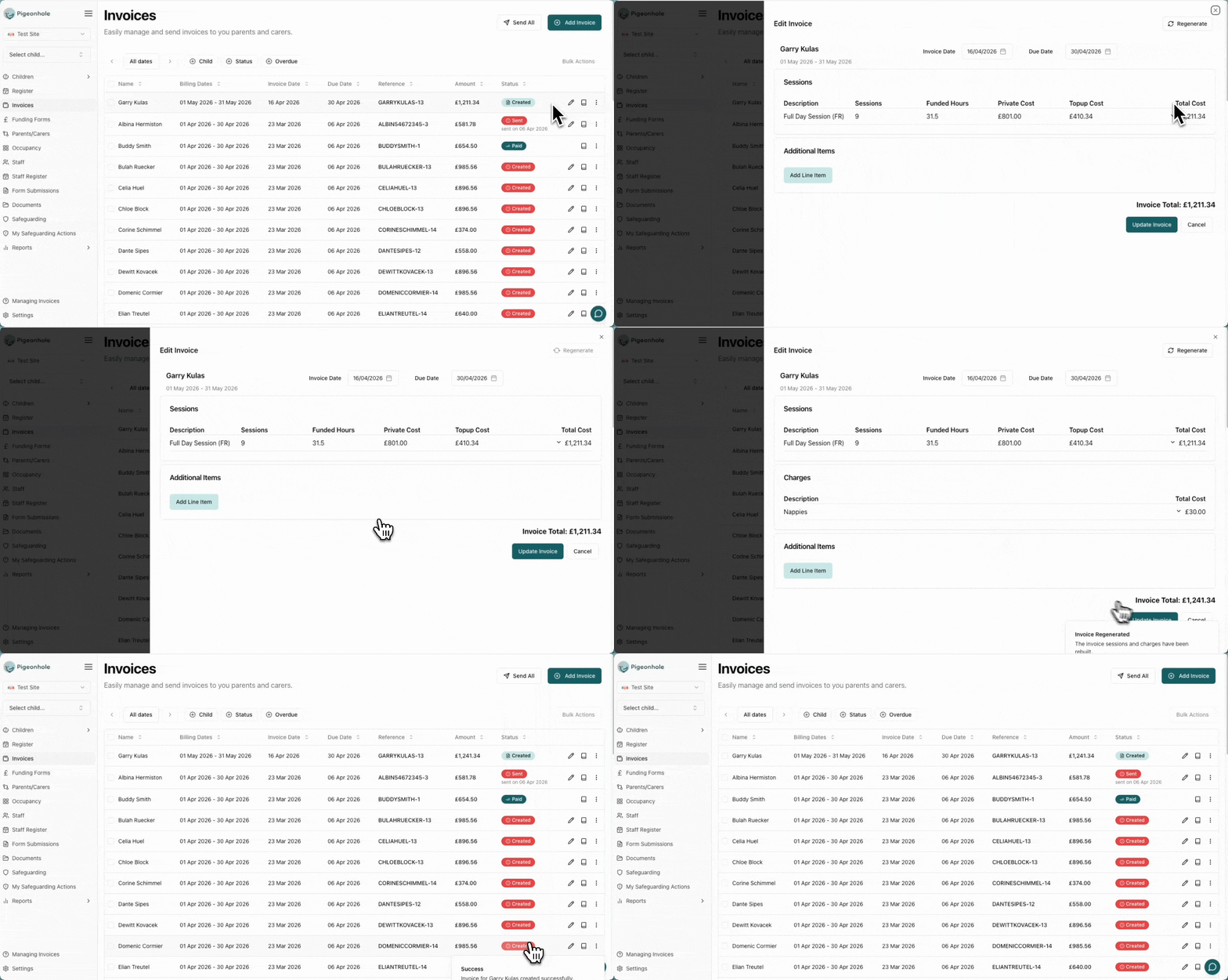
Rebuilds all session and charge line items from the child's current schedule data. This is useful when a child's sessions or charges have changed after the invoice was created.
**What it preserves:**
* Additional items added manually to the invoice
* All payment records
* The invoice reference number
**When to use:**
* A child's regular sessions were updated after the invoice was created
* Charges were added or removed from the child's profile
* Session times or rates changed and the invoice needs to reflect the new data
To regenerate:
1. Open the invoice actions menu.
2. Click **Regenerate Invoice**.
3. The line items will be rebuilt from the child's current schedule. Review the updated invoice to confirm the changes are correct.
 ## Recreate Accounting Invoice
Clears the accounting integration link and triggers a fresh sync to your accounting software. This creates a new invoice in Xero, QuickBooks, or your connected platform.
**When to use:**
* The invoice was deleted from your accounting software and needs to be recreated
* Persistent integration errors that cannot be resolved with a simple resync (see [Integration Errors](/managers/invoicing/integration-errors))
To recreate:
1. Open the invoice actions menu on the erroring invoice.
2. Click **Recreate Accounting Invoice**.
3. Confirm the action — the existing accounting link will be removed and a new invoice will be created in your accounting software.
If the original invoice still exists in your accounting software, recreating it will result in a duplicate. Void or delete the old accounting invoice first if it is still present.
## Choosing the Right Action
| Scenario | Action |
| ------------------------------------- | --------------------------- |
| Child's sessions or charges changed | Regenerate Invoice |
| Manual charges need recalculating | Regenerate Invoice |
| Accounting invoice deleted externally | Recreate Accounting Invoice |
| Persistent accounting sync errors | Recreate Accounting Invoice |
## Recreate Accounting Invoice
Clears the accounting integration link and triggers a fresh sync to your accounting software. This creates a new invoice in Xero, QuickBooks, or your connected platform.
**When to use:**
* The invoice was deleted from your accounting software and needs to be recreated
* Persistent integration errors that cannot be resolved with a simple resync (see [Integration Errors](/managers/invoicing/integration-errors))
To recreate:
1. Open the invoice actions menu on the erroring invoice.
2. Click **Recreate Accounting Invoice**.
3. Confirm the action — the existing accounting link will be removed and a new invoice will be created in your accounting software.
If the original invoice still exists in your accounting software, recreating it will result in a duplicate. Void or delete the old accounting invoice first if it is still present.
## Choosing the Right Action
| Scenario | Action |
| ------------------------------------- | --------------------------- |
| Child's sessions or charges changed | Regenerate Invoice |
| Manual charges need recalculating | Regenerate Invoice |
| Accounting invoice deleted externally | Recreate Accounting Invoice |
| Persistent accounting sync errors | Recreate Accounting Invoice |