> ## Documentation Index
> Fetch the complete documentation index at: https://pigeonholeapp.co.uk/docs/llms.txt
> Use this file to discover all available pages before exploring further.
# Unbilled Sessions Report
> Find children with regular sessions that were never invoiced, and bill the missing days in a couple of clicks.
The unbilled sessions report warns you when a child attended regular sessions that never made it onto an invoice. For example, a child might have joined part-way through a month, had their schedule backdated, or left before their last month was billed. It sits at the top of the **Invoices** page and is shown to managers and anyone with the **Finance Manager** permission.
Open in app: [Invoices](https://pigeonholeapp.co.uk/app/admin/invoices).
## The Banner
When there is something unbilled, an amber banner tells you how many children are affected and since when, for example **53 children have unbilled sessions since 1 April 2026**.
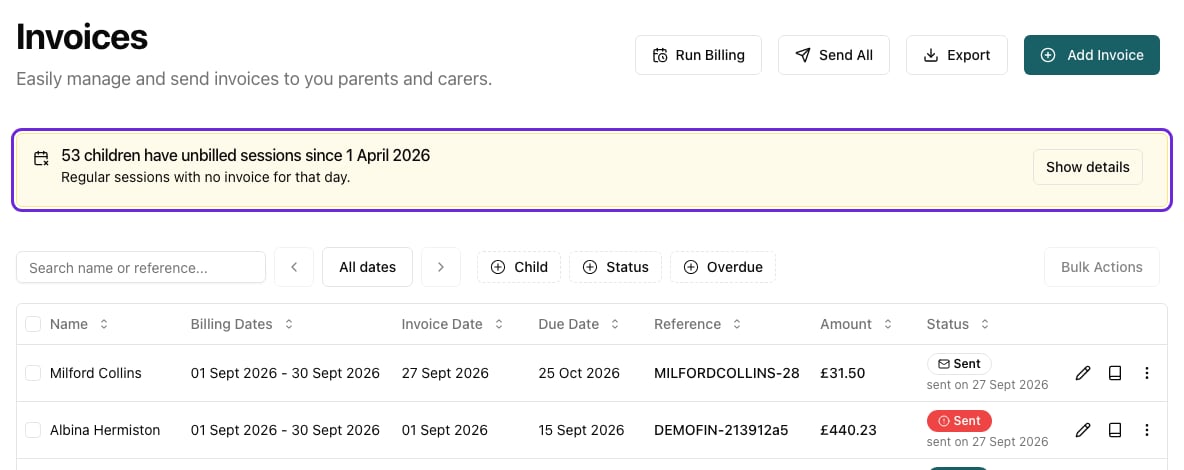 When everything is billed, a short grey line confirms it: **No unbilled regular sessions since …**.
## Seeing the Details
Click **Show details**. The dialog lists each child with unbilled days, and for each one the months affected and how many days are unbilled in each month.
When everything is billed, a short grey line confirms it: **No unbilled regular sessions since …**.
## Seeing the Details
Click **Show details**. The dialog lists each child with unbilled days, and for each one the months affected and how many days are unbilled in each month.
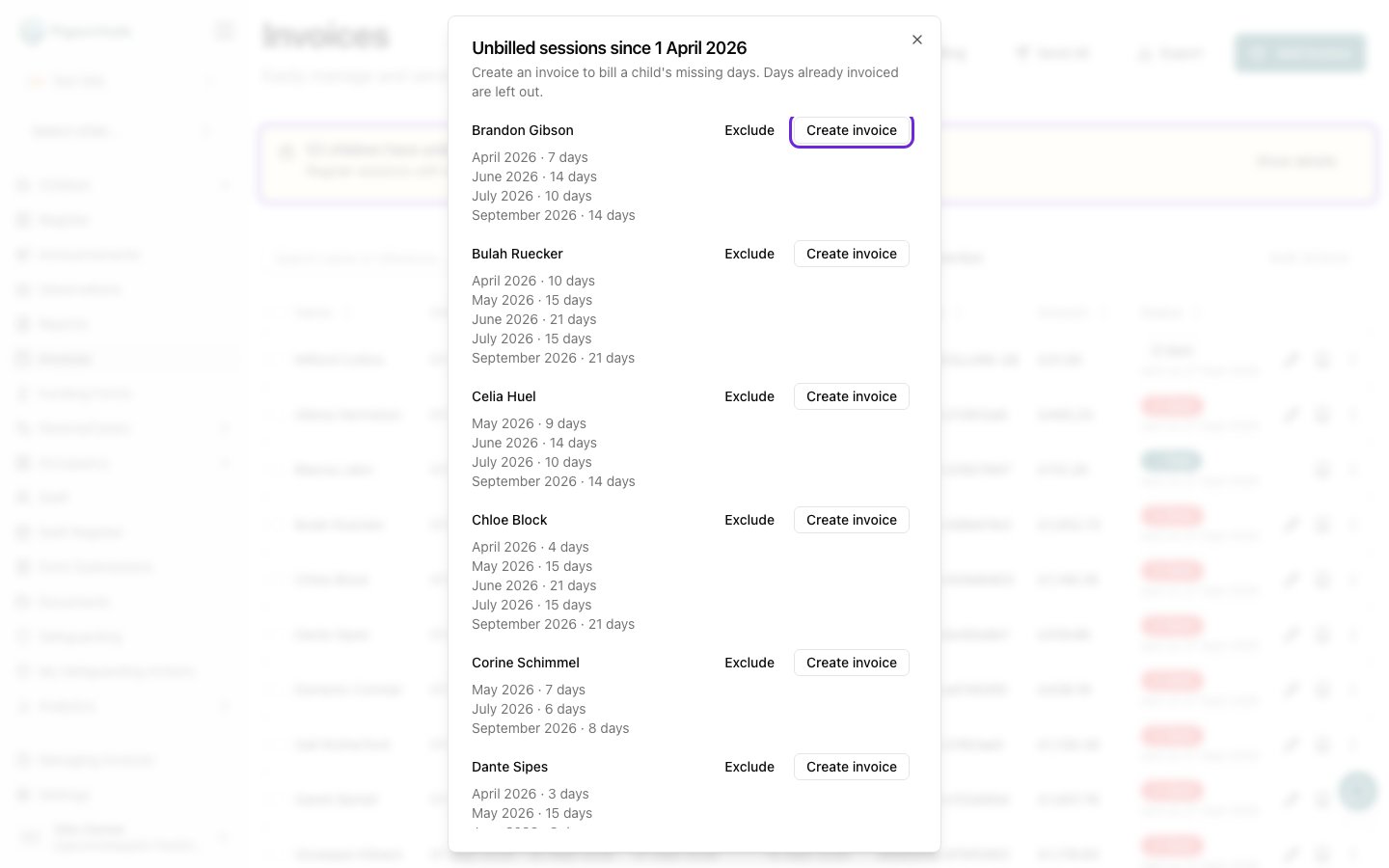 Children who have been archived are marked **Archived**. They are included on purpose: a leaver's final month is one of the easiest invoices to miss.
## What Counts as Unbilled
A day counts as unbilled when a child had a **regular** (recurring) session that day, billing would charge for it, and it isn't on any invoice yet.
* **The report covers the last six full months.** The current month is never included, as it is usually still to be billed. On 15 October, for example, it covers April to September.
* **It starts from your first invoice in Pigeonhole.** Months before you started invoicing in Pigeonhole are ignored, as they were billed elsewhere. If your setting hasn't raised an invoice in Pigeonhole yet, nothing is reported.
* **Only regular sessions count.** One-off sessions and extra charges are never reported.
* **Days billing would skip are skipped here too.** That includes closure days, holidays for term-time-only children, and days before a child's start date.
* **Leavers stop on their last day.** A child is reported up to their leaving date, or the day they were archived if that is earlier.
* **Days with nothing to pay are left out** while [Create £0 Invoices](/docs/managers/invoicing/settings#zero-value-invoices) is off, for example fully funded days. If you turn that setting on, those days count as unbilled until they are invoiced.
The report updates as soon as you create, edit or delete invoices or change a child's sessions.
## Billing the Missing Days
1. In the details dialog, click **Create invoice** next to the child.
2. The **Add Invoice** sheet opens with the child selected and the period set from their first unbilled day to their last.
3. Check the dates, invoice date and any additional items, then create the invoice as usual.
Days in that range that are already invoiced are skipped automatically, so the invoice only charges for the missing days. This works for archived children too. See [Creating Invoices](/docs/managers/invoicing/creating-invoices).
## Excluding a Child
Some children will always show up, for example if their sessions are billed outside Pigeonhole. You can hide them from the report.
**From the dialog:** click **Exclude** next to the child and confirm.
**From the child's profile:**
1. Open the child and go to **Invoicing → Settings**.
2. In **Invoice Automation**, turn on **Exclude from Unbilled Sessions Report**. It saves straight away, with no need to click **Save**.
Children who have been archived are marked **Archived**. They are included on purpose: a leaver's final month is one of the easiest invoices to miss.
## What Counts as Unbilled
A day counts as unbilled when a child had a **regular** (recurring) session that day, billing would charge for it, and it isn't on any invoice yet.
* **The report covers the last six full months.** The current month is never included, as it is usually still to be billed. On 15 October, for example, it covers April to September.
* **It starts from your first invoice in Pigeonhole.** Months before you started invoicing in Pigeonhole are ignored, as they were billed elsewhere. If your setting hasn't raised an invoice in Pigeonhole yet, nothing is reported.
* **Only regular sessions count.** One-off sessions and extra charges are never reported.
* **Days billing would skip are skipped here too.** That includes closure days, holidays for term-time-only children, and days before a child's start date.
* **Leavers stop on their last day.** A child is reported up to their leaving date, or the day they were archived if that is earlier.
* **Days with nothing to pay are left out** while [Create £0 Invoices](/docs/managers/invoicing/settings#zero-value-invoices) is off, for example fully funded days. If you turn that setting on, those days count as unbilled until they are invoiced.
The report updates as soon as you create, edit or delete invoices or change a child's sessions.
## Billing the Missing Days
1. In the details dialog, click **Create invoice** next to the child.
2. The **Add Invoice** sheet opens with the child selected and the period set from their first unbilled day to their last.
3. Check the dates, invoice date and any additional items, then create the invoice as usual.
Days in that range that are already invoiced are skipped automatically, so the invoice only charges for the missing days. This works for archived children too. See [Creating Invoices](/docs/managers/invoicing/creating-invoices).
## Excluding a Child
Some children will always show up, for example if their sessions are billed outside Pigeonhole. You can hide them from the report.
**From the dialog:** click **Exclude** next to the child and confirm.
**From the child's profile:**
1. Open the child and go to **Invoicing → Settings**.
2. In **Invoice Automation**, turn on **Exclude from Unbilled Sessions Report**. It saves straight away, with no need to click **Save**.
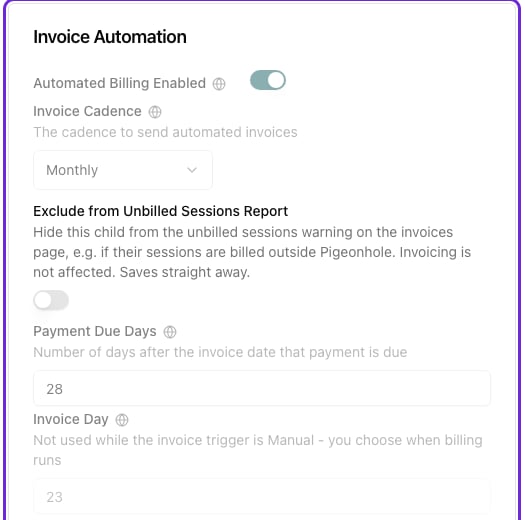 Excluding a child only affects this report. It doesn't change how they are invoiced, and it doesn't count as overriding your site's invoice settings. The change is recorded in the audit log.
### Including a child again
Turn **Exclude from Unbilled Sessions Report** off on the child's **Invoicing → Settings** tab.
Archived children have no **Settings** tab. To include an excluded archived child again, restore them first, turn the switch off, then archive them again if needed.
## Frequently Asked Questions
### Why does a child show days I'm sure we invoiced?
Check the invoice covers those exact days. An invoice for a one-off session on a day doesn't cover the child's regular session that day, and an invoice that was deleted no longer counts.
### Why isn't a fully funded child listed?
While **Create £0 Invoices** is off, days that cost the parent nothing aren't reported, because billing wouldn't create an invoice for them anyway.
### Who can see the report?
Managers and staff with the **Finance Manager** permission. Parents never see it.
This documentation is built and hosted on [Mintlify](https://mintlify.com), a developer documentation platform.
Excluding a child only affects this report. It doesn't change how they are invoiced, and it doesn't count as overriding your site's invoice settings. The change is recorded in the audit log.
### Including a child again
Turn **Exclude from Unbilled Sessions Report** off on the child's **Invoicing → Settings** tab.
Archived children have no **Settings** tab. To include an excluded archived child again, restore them first, turn the switch off, then archive them again if needed.
## Frequently Asked Questions
### Why does a child show days I'm sure we invoiced?
Check the invoice covers those exact days. An invoice for a one-off session on a day doesn't cover the child's regular session that day, and an invoice that was deleted no longer counts.
### Why isn't a fully funded child listed?
While **Create £0 Invoices** is off, days that cost the parent nothing aren't reported, because billing wouldn't create an invoice for them anyway.
### Who can see the report?
Managers and staff with the **Finance Manager** permission. Parents never see it.
This documentation is built and hosted on [Mintlify](https://mintlify.com), a developer documentation platform.