> ## Documentation Index
> Fetch the complete documentation index at: https://pigeonholeapp.co.uk/docs/llms.txt
> Use this file to discover all available pages before exploring further.
# Cost one family leaving
> Find out what the year loses if a family you are unsure about gives notice — priced from their actual week, not an average.
A parent mentions they might move in the spring. A family is going through a separation. Somebody's hours are being cut and they are talking about dropping a day.
You can guess what that costs, or you can ask. **Schedule Leaver** takes a child you already have and works out what the year looks like without them, from their real booking.
## Step 1: Open it from the From families card
A leaver is about the setting rather than one room, so the option lives on the **From families** card: click **Adjust**, then choose the room, then the **Schedule Leaver** tab.
 If your setting has no rooms, the **Schedule Leaver** tab is on every change sheet, because there is only one place a child can be.
## Step 2: Pick the child, not a number
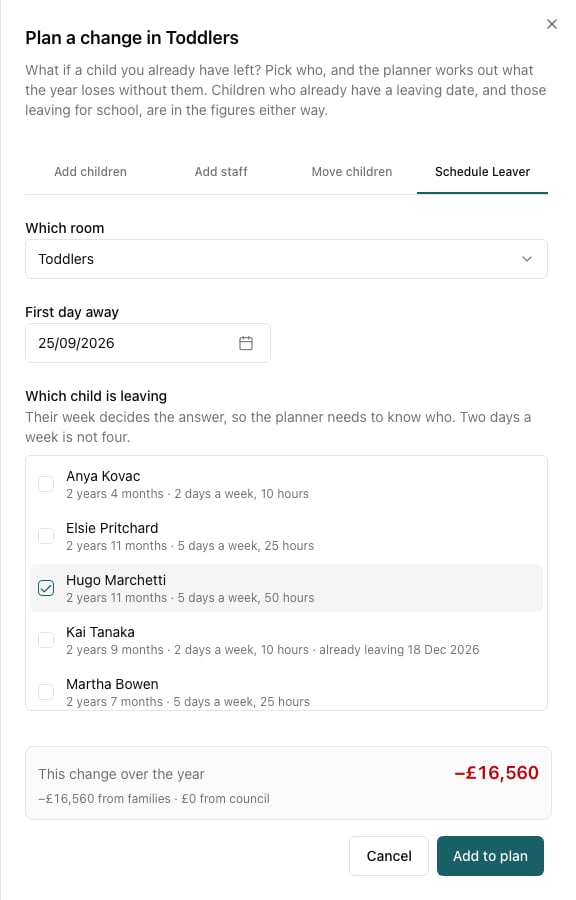
The planner asks **which** child, not how many — because their week decides the answer. The list shows each child's age, how many days a week they come and how many hours, so you can tell a five-day full-timer from a two-morning child at a glance.
Set **First day away** to the date they would stop coming.
## Step 3: Read what it costs
In this example, losing one full-time toddler — five days a week, 50 hours — costs **£16,560** over the year, all of it from families.
Compare that with the two-day child two rows above, worth a fraction of it. "A child leaving" is not one number; it is between about £900 and £22,000 depending on who leaves.
Children who **already have a leaving date**, and those leaving for school at the end of August, are in the figures either way — the planner already knows they are going. The list marks them ("already leaving 18 Dec 2026"), and planning them as a leaver again will show a small figure or none at all. This tab is for the ones you are unsure about.
## Step 4: Use it to answer the real question
The figure on its own is only half the value. The useful moves:
* **Would keeping them be worth a discount?** If a family is leaving over cost, you now know what the place is worth to you over the year, and what you could sensibly offer against it.
* **Could you refill the place?** Add the leaver and a planned child from your [waiting list](/docs/managers/occupancy-planning/scenarios/waiting-list) in the same plan. If the replacement is worth more than the leaver, the plan's total goes up, and you have your answer.
* **Does the room still need the same staff?** Losing a child rarely lets you cut a shift, but losing three might. The room's free places go up as soon as the leaver is in the plan.
* **What if several go?** Tick more than one child, or add several leaver changes, and see the total. This is the honest way to stress-test a year: plan the three families you are least sure about all leaving, and see whether the year still works.
## Step 5: Keep it, don't act on it
Nothing here changes the child's record. If the family does give notice, set their real leaving date on [their profile](https://pigeonholeapp.co.uk/app/admin/children) — and then take the planned leaver back out of your plan, or it will be counted twice.
Save the plan if it is a conversation you'll come back to: "If the Marchettis go in April".
## Things worth knowing
* **The figure is measured at your saved prices**, so a leaver you plan alongside a price rise is costed at the price they were actually paying — the two changes don't double-count.
* **Council income usually doesn't move for an under-three** with no funded hours; for a three-year-old with 30 funded hours it is most of the loss. The split under the figure shows which.
* **A leaver frees places for the rest of the year**, so a leaver in December and a starter in January can net out to almost nothing. Plan both and read the total, not the two figures separately.
If your setting has no rooms, the **Schedule Leaver** tab is on every change sheet, because there is only one place a child can be.
## Step 2: Pick the child, not a number
The planner asks **which** child, not how many — because their week decides the answer. The list shows each child's age, how many days a week they come and how many hours, so you can tell a five-day full-timer from a two-morning child at a glance.
Set **First day away** to the date they would stop coming.
## Step 3: Read what it costs
In this example, losing one full-time toddler — five days a week, 50 hours — costs **£16,560** over the year, all of it from families.
Compare that with the two-day child two rows above, worth a fraction of it. "A child leaving" is not one number; it is between about £900 and £22,000 depending on who leaves.
Children who **already have a leaving date**, and those leaving for school at the end of August, are in the figures either way — the planner already knows they are going. The list marks them ("already leaving 18 Dec 2026"), and planning them as a leaver again will show a small figure or none at all. This tab is for the ones you are unsure about.
## Step 4: Use it to answer the real question
The figure on its own is only half the value. The useful moves:
* **Would keeping them be worth a discount?** If a family is leaving over cost, you now know what the place is worth to you over the year, and what you could sensibly offer against it.
* **Could you refill the place?** Add the leaver and a planned child from your [waiting list](/docs/managers/occupancy-planning/scenarios/waiting-list) in the same plan. If the replacement is worth more than the leaver, the plan's total goes up, and you have your answer.
* **Does the room still need the same staff?** Losing a child rarely lets you cut a shift, but losing three might. The room's free places go up as soon as the leaver is in the plan.
* **What if several go?** Tick more than one child, or add several leaver changes, and see the total. This is the honest way to stress-test a year: plan the three families you are least sure about all leaving, and see whether the year still works.
## Step 5: Keep it, don't act on it
Nothing here changes the child's record. If the family does give notice, set their real leaving date on [their profile](https://pigeonholeapp.co.uk/app/admin/children) — and then take the planned leaver back out of your plan, or it will be counted twice.
Save the plan if it is a conversation you'll come back to: "If the Marchettis go in April".
## Things worth knowing
* **The figure is measured at your saved prices**, so a leaver you plan alongside a price rise is costed at the price they were actually paying — the two changes don't double-count.
* **Council income usually doesn't move for an under-three** with no funded hours; for a three-year-old with 30 funded hours it is most of the loss. The split under the figure shows which.
* **A leaver frees places for the rest of the year**, so a leaver in December and a starter in January can net out to almost nothing. Plan both and read the total, not the two figures separately.