> ## Documentation Index
> Fetch the complete documentation index at: https://pigeonholeapp.co.uk/docs/llms.txt
> Use this file to discover all available pages before exploring further.
# See next September before it arrives
> Find out how many children leave for school, who moves up a room, and exactly how big a hole that leaves in next year's income.
Every nursery loses its oldest children each August and has to refill from the bottom. The question is how much of a hole that leaves, and how early you have to start filling it.
The planner answers it in one click, because it knows every child's date of birth, every room's move-on age and every leaving date you have entered.
## Step 1: Look at this year first
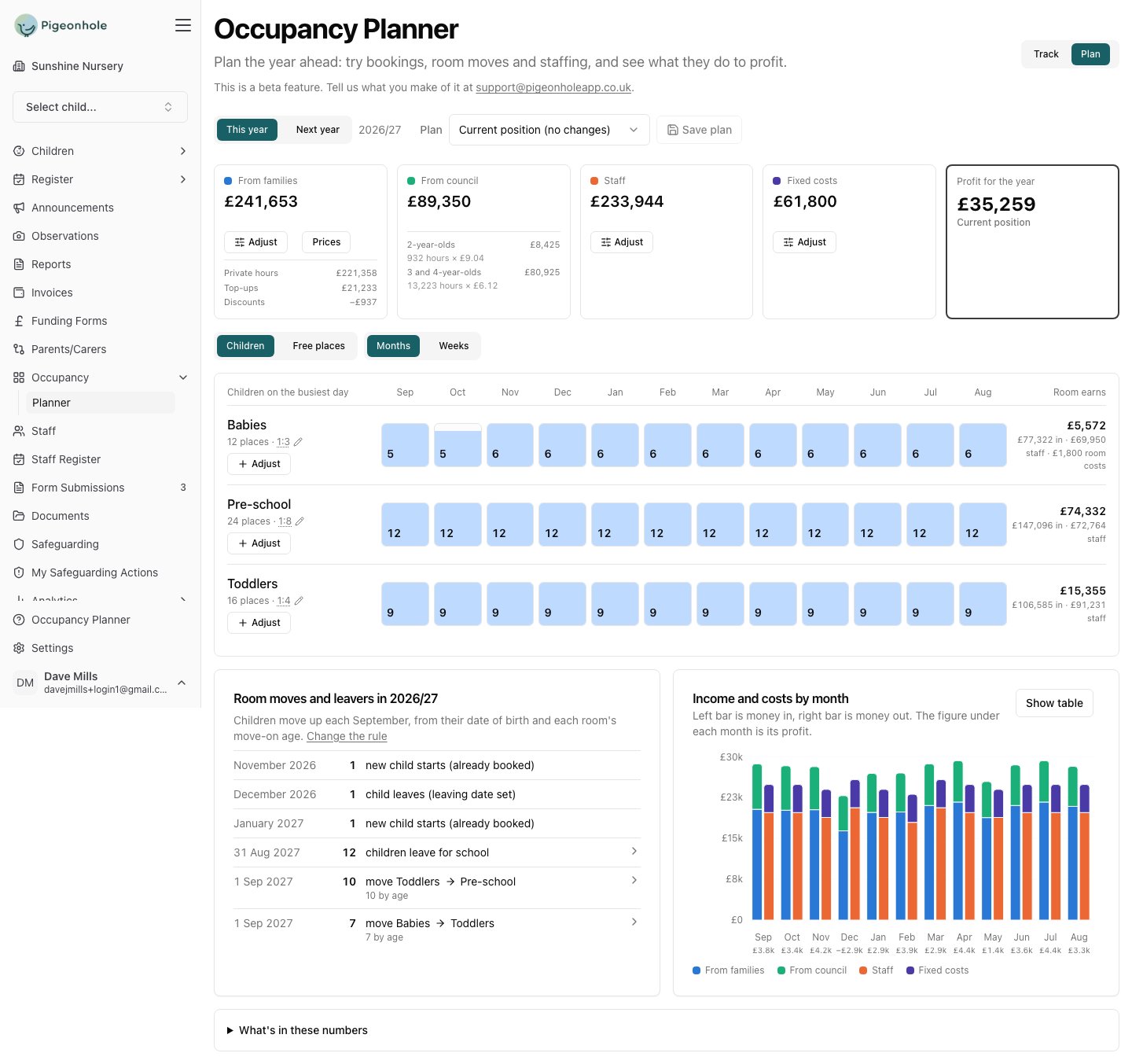
Open the planner and leave it on **This year**. This is your baseline: what the year makes if nothing changes.
 ## Step 2: See who is leaving, and when
Scroll to **Room moves and leavers**. It is the story of your year in a dozen lines.
## Step 2: See who is leaving, and when
Scroll to **Room moves and leavers**. It is the story of your year in a dozen lines.
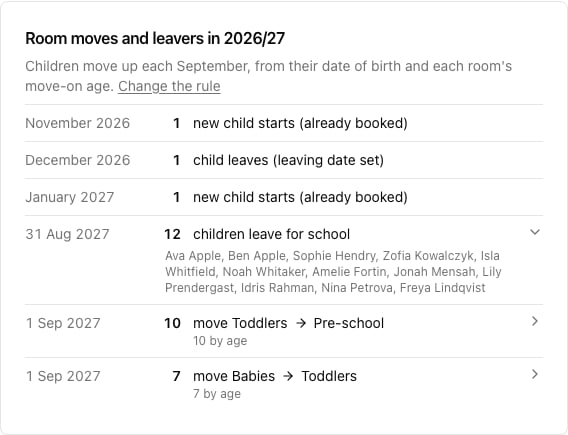 Each row is a real event:
* **New child starts (already booked)** — children whose start date falls inside the year. They are already in the figures from the month they arrive.
* **Child leaves (leaving date set)** — a family who has given notice. Also already in the figures.
* **Children leave for school** — the end of August after they turn four, unless they have their own leaving date. Click the row to see their names.
* **Move Toddlers → Pre-school**, **move Babies → Toddlers** — the September moves, worked out from each child's age and each room's move-on age.
In this example, **twelve children leave for school on 31 August**, ten toddlers move up to take their places, and seven babies move up behind them. Which means the baby room empties completely.
If the moves aren't what you expect, check [Settings → Rooms](https://pigeonholeapp.co.uk/app/admin/settings/rooms): the move-up rule, each room's move-on age, and which room it feeds. Moves you have already scheduled in Track always take priority over the rule.
## Step 3: Switch to next year
Click **Next year**. This is not just a different set of dates — the planner starts from the roll you would have *after* the September moves, with this year's school leavers gone.
Each row is a real event:
* **New child starts (already booked)** — children whose start date falls inside the year. They are already in the figures from the month they arrive.
* **Child leaves (leaving date set)** — a family who has given notice. Also already in the figures.
* **Children leave for school** — the end of August after they turn four, unless they have their own leaving date. Click the row to see their names.
* **Move Toddlers → Pre-school**, **move Babies → Toddlers** — the September moves, worked out from each child's age and each room's move-on age.
In this example, **twelve children leave for school on 31 August**, ten toddlers move up to take their places, and seven babies move up behind them. Which means the baby room empties completely.
If the moves aren't what you expect, check [Settings → Rooms](https://pigeonholeapp.co.uk/app/admin/settings/rooms): the move-up rule, each room's move-on age, and which room it feeds. Moves you have already scheduled in Track always take priority over the rule.
## Step 3: Switch to next year
Click **Next year**. This is not just a different set of dates — the planner starts from the roll you would have *after* the September moves, with this year's school leavers gone.
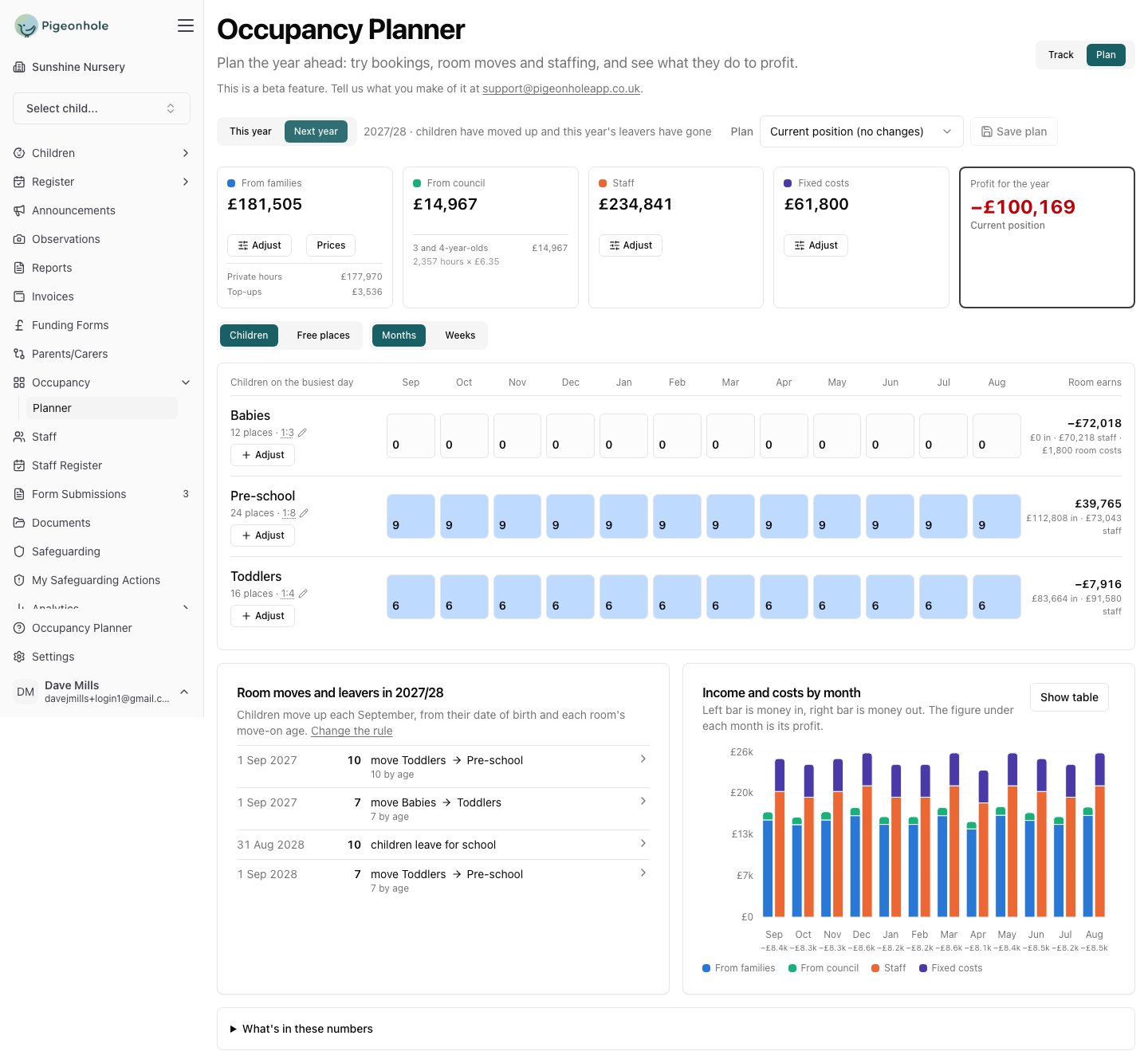 Read it row by row:
* **Babies: 0 children, every month.** Everyone moved up and nobody has been booked in behind them. The room still costs £70,218 in staff and £1,800 in its own costs, so it loses £72,018.
* **Pre-school: 9 children** — this year's toddlers, moved up. It was 12.
* **Toddlers: 6** — this year's babies. It was 9.
* **Profit: −£100,169.** The income halves; the staff and the building cost the same.
That figure is not a prediction of disaster. It is the size of the job: **this is what you have to fill between now and September**, and you are seeing it a year early.
Children on your waiting list are **not** counted — they have no booking yet. Neither are enquiries. Next year's view is deliberately the worst case: only what is actually booked.
## Step 4: Work out what closes the gap
Now start planning against it. Each room's **Adjust** button adds children to that room, and every change is priced on its own so you can see what each one is worth.
The natural order is bottom-up, because that is how a nursery refills:
1. **Fill the baby room**, which is empty and is where new families arrive. See [filling the gaps from your waiting list](/docs/managers/occupancy-planning/scenarios/waiting-list).
2. **Check the rooms above it** — the moves have already put children there, but not as many as left.
3. **Watch the staffing**, because filling a room past what the rota covers creates a shortfall the planner will flag. See [staffing the year you have planned](/docs/managers/occupancy-planning/scenarios/staffing).
## Step 5: Save what you decide
Save the plan with a name that says what it assumes — "Next year, if we fill Babies by September". Come back to it as real bookings arrive: each child who is really booked appears in the baseline, and you take their planned stand-in out of the plan. The name you gave the planned child is how you know which one to remove.
## Things worth knowing
* **Council income falls further than family income.** Your school leavers are three- and four-year-olds carrying 15 or 30 funded hours each; the babies replacing them carry none. In this example council income drops from £89,350 to £14,967.
* **Funded hours come from the booking, not from the child's age.** A two-year-old who will become eligible next year still shows today's hours, so next year's council income reads low until the booking is updated. Add the extra hours as a planned child to see what they would be worth.
* **Next year's funding rates may not exist yet.** If they haven't been set, the planner uses the most recent year's and tells you, with a link to [Settings → Funding](https://pigeonholeapp.co.uk/app/admin/settings/funding).
* **The year runs 1 September to 31 August**, so "31 Aug" events land on the last day of the year you are looking at, and "1 Sep" moves belong to the year after.
Read it row by row:
* **Babies: 0 children, every month.** Everyone moved up and nobody has been booked in behind them. The room still costs £70,218 in staff and £1,800 in its own costs, so it loses £72,018.
* **Pre-school: 9 children** — this year's toddlers, moved up. It was 12.
* **Toddlers: 6** — this year's babies. It was 9.
* **Profit: −£100,169.** The income halves; the staff and the building cost the same.
That figure is not a prediction of disaster. It is the size of the job: **this is what you have to fill between now and September**, and you are seeing it a year early.
Children on your waiting list are **not** counted — they have no booking yet. Neither are enquiries. Next year's view is deliberately the worst case: only what is actually booked.
## Step 4: Work out what closes the gap
Now start planning against it. Each room's **Adjust** button adds children to that room, and every change is priced on its own so you can see what each one is worth.
The natural order is bottom-up, because that is how a nursery refills:
1. **Fill the baby room**, which is empty and is where new families arrive. See [filling the gaps from your waiting list](/docs/managers/occupancy-planning/scenarios/waiting-list).
2. **Check the rooms above it** — the moves have already put children there, but not as many as left.
3. **Watch the staffing**, because filling a room past what the rota covers creates a shortfall the planner will flag. See [staffing the year you have planned](/docs/managers/occupancy-planning/scenarios/staffing).
## Step 5: Save what you decide
Save the plan with a name that says what it assumes — "Next year, if we fill Babies by September". Come back to it as real bookings arrive: each child who is really booked appears in the baseline, and you take their planned stand-in out of the plan. The name you gave the planned child is how you know which one to remove.
## Things worth knowing
* **Council income falls further than family income.** Your school leavers are three- and four-year-olds carrying 15 or 30 funded hours each; the babies replacing them carry none. In this example council income drops from £89,350 to £14,967.
* **Funded hours come from the booking, not from the child's age.** A two-year-old who will become eligible next year still shows today's hours, so next year's council income reads low until the booking is updated. Add the extra hours as a planned child to see what they would be worth.
* **Next year's funding rates may not exist yet.** If they haven't been set, the planner uses the most recent year's and tells you, with a link to [Settings → Funding](https://pigeonholeapp.co.uk/app/admin/settings/funding).
* **The year runs 1 September to 31 August**, so "31 Aug" events land on the last day of the year you are looking at, and "1 Sep" moves belong to the year after.