> ## Documentation Index
> Fetch the complete documentation index at: https://pigeonholeapp.co.uk/docs/llms.txt
> Use this file to discover all available pages before exploring further.
# Parents & Carers Overview
> Manage parents and carers in your nursery setting.
# Parents & Carers
The Parent/Carer management system allows you to register and manage parents and carers in the nursery management system. This includes viewing all parents and carers, adding new members, configuring their profiles, and managing their relationships with children.
Learn how to add new parents and carers, create them from a child profile, and configure relationship details.
Edit existing profiles, send invitations, and search or filter your parent and carer list.
## Parent/Carer List Overview
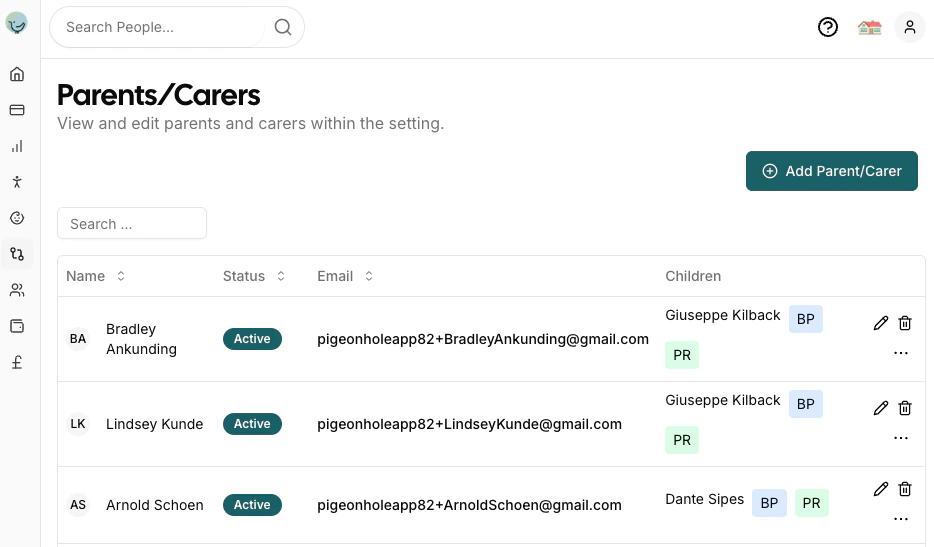
The main Parents & Carers page displays a comprehensive list of all parents and carers in your nursery setting. This view provides quick access to essential information and management tools.
The parent/carer list displays the following information in a table format:
* **Name**: Parent/carer's full name with their profile picture shown in the first column
* **Status**: Shows either the last login date/time, "Invite Sent" indicator, or a dash if no invite has been sent
* **Email**: Contact email address
* **Children**: Shows the children they are associated with, along with special indicators:
* **BP**: Blue badge indicating they are a Bill Payer for that child
* **PR**: Green badge indicating they have Parental Responsibility for that child
* **Actions**: Edit, delete, and send invite