> ## Documentation Index
> Fetch the complete documentation index at: https://pigeonholeapp.co.uk/docs/llms.txt
> Use this file to discover all available pages before exploring further.
# Staff Management Overview
> Manage your nursery staff members, their profiles, schedules, and permissions.
# Staff Management
The staff management system allows you to register and manage staff members in the nursery management system. This includes viewing all staff, adding new members, and configuring their profiles, schedules, and permissions.
How to add new staff members with profile and schedule setup.
Understanding and configuring staff permission levels.
***
## Staff List Overview
The main Staff page displays a comprehensive list of all staff members in your nursery setting. This view provides quick access to essential information and management tools.
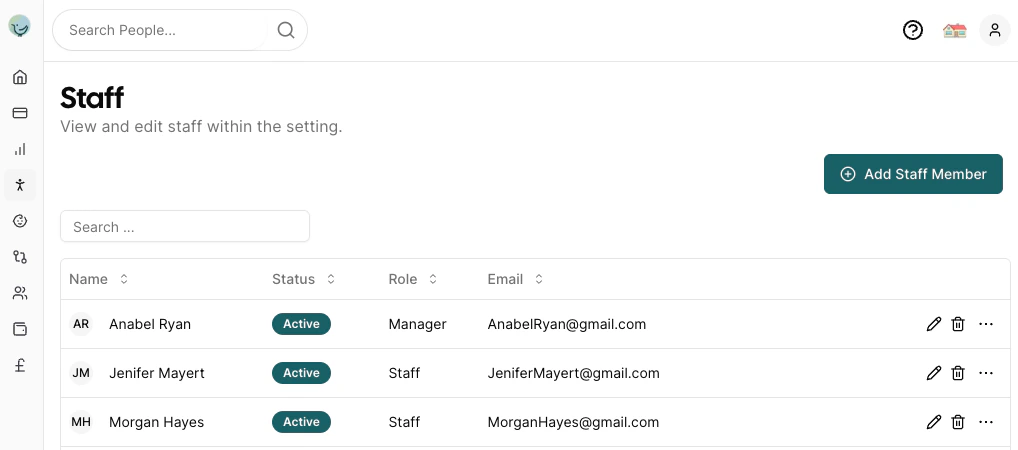 The staff list displays the following information in a table format:
* **Name**: Staff member's full name with their profile picture shown in the first column
* **Status**: Shows either the last login date/time, "Invite Sent" indicator, or a dash if no invite has been sent
* **Role**: Staff member's position (Manager, Staff, etc.)
* **Email**: Contact email address
* **Actions**: Edit, delete, and additional management options
## Managing Existing Staff
From the main staff list, you can:
* **Search**: Use the search bar to quickly find specific staff members
* **Edit**: Click the edit icon to modify staff details and schedules
* **Delete**: Remove staff members
* **Send Invite**: Send an invitation email to allow the staff member to log in
The staff list displays the following information in a table format:
* **Name**: Staff member's full name with their profile picture shown in the first column
* **Status**: Shows either the last login date/time, "Invite Sent" indicator, or a dash if no invite has been sent
* **Role**: Staff member's position (Manager, Staff, etc.)
* **Email**: Contact email address
* **Actions**: Edit, delete, and additional management options
## Managing Existing Staff
From the main staff list, you can:
* **Search**: Use the search bar to quickly find specific staff members
* **Edit**: Click the edit icon to modify staff details and schedules
* **Delete**: Remove staff members
* **Send Invite**: Send an invitation email to allow the staff member to log in