
Concerns recorded properly, seen only by those who should
Log a concern in moments, keep the chronology in one place, and know that access stops with your DSLs. A defensible record when Ofsted asks how a concern was handled.
- Locked down by role, not by trust
- DSL-only access
- Every update kept in order
- Full chronology
- Who recorded what, and when
- Audit trail
Locked down by role, not by trust
Every update kept in order
Who recorded what, and when

Comprehensive Child Protection
Pigeonhole's safeguarding module provides Designated Safeguarding Leads (DSLs) and their teams with a secure, comprehensive system for managing all aspects of safeguarding. From recording initial concerns through to sign off, every step is documented and accessible.
Record Concerns Securely
Create detailed records of concern with all necessary information including descriptions, categories, related persons, and supporting attachments.
Sign-Off Rules
Your safeguarding lead decides who must read a concern and how many leads must sign before it can close. Every concern shows who has seen it.
Leads Told Straight Away
Your DSLs and deputies are emailed the moment a concern is raised, and named staff can see when an action assigned to them has been read.
Mobile App Integration
Staff raise concerns from the mobile app as it happens, and can be asked to sign the record when they raise it.
Secure History Transfer
Easily generate and share comprehensive safeguarding histories with secure, password-protected links.
How It Works
Four simple steps to comprehensive safeguarding management
Raise Concern
Staff or DSLs create a record of concern
Assign Actions
DSLs create and assign follow-up actions
Track Progress
Monitor concerns and update staff with actions instantly.
Sign Off
Close only once the right leads have read and signed
Nothing Closes Before the Right People Have Read It
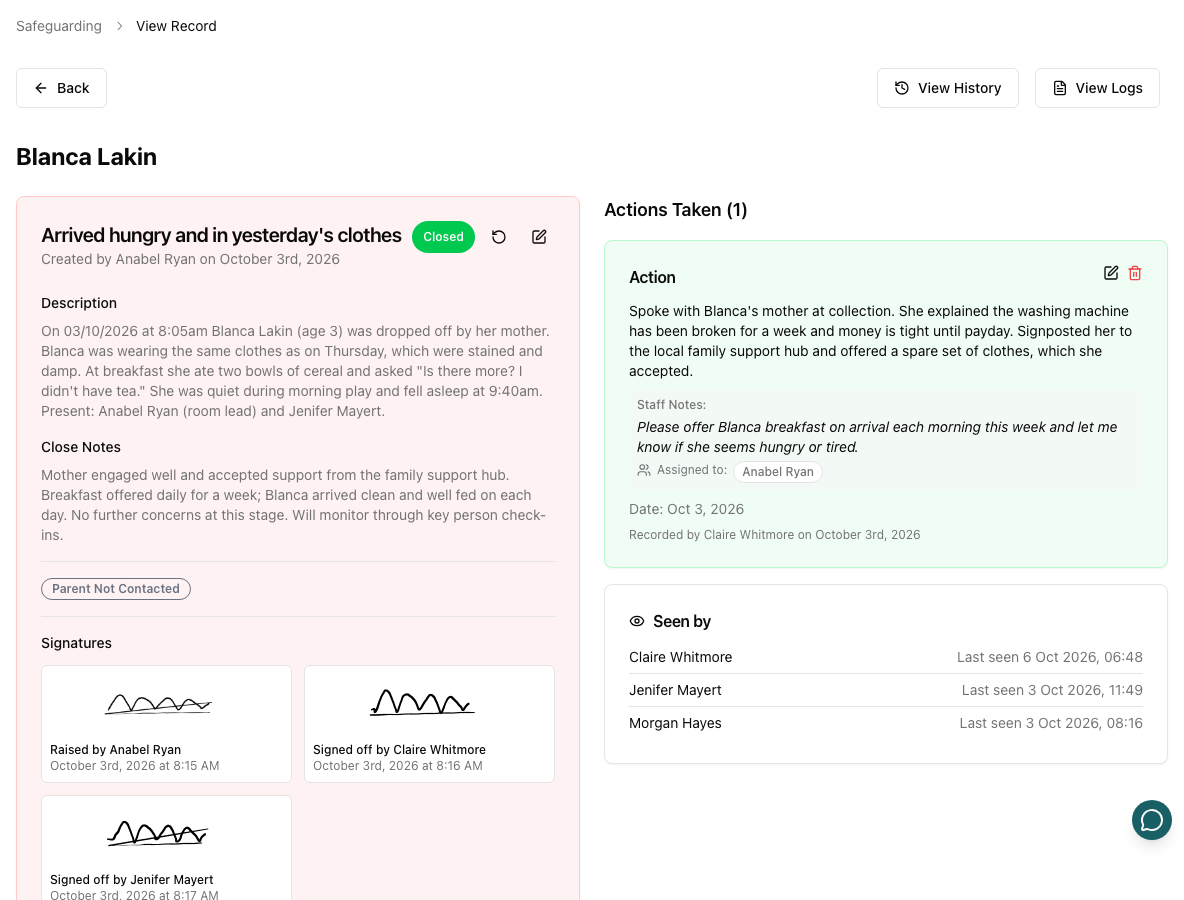
Every concern shows which of your safeguarding team has opened it, and when. Your lead sets the rules for closing: who must have read it first, and how many leads must sign the outcome. The concern closes itself on the signature that meets them.
- Seen-by panel on every record of concern
- Read-before-close and signatures-to-close rules
- Optional signature from the person raising it
- A lead who is away is skipped, so nothing deadlocks
When the concern is about a colleague's own child
In a small setting, the person who would normally read a concern may be the child's parent. Your lead can exclude any member of staff from a child, and every concern about that child — as the subject or a linked child — disappears for them: the record, its actions, the history and the AI summary. A lead who is a parent can declare their own exclusion. Managers don't see safeguarding records at all unless they are also on the safeguarding team.
Key Features
Everything you need to manage safeguarding effectively and efficiently
Records of Concern
Create comprehensive records with all necessary details. Filter and search by status, category, person, or date range.
- Detailed description and categorization
- Link to children, staff, or whole setting
- Attach supporting documents
- Track status and updates
Action Management
Assign and track actions taken in response to concerns with full accountability.
- Assign actions to specific staff
- Set deadlines and track completion
- Read receipts for named staff
- View action history
Safeguarding History
View complete safeguarding histories and generate secure, shareable reports.
- Chronological timeline
- AI-powered summaries
- Secure history sharing via email
- Password-protected access
Configurable Settings
Customize the system to match your setting's specific needs and workflows.
- Custom concern categories
- DSL and deputy DSL roles
- Read and sign-off rules for closing
- Per-staff child exclusions
See it on your own setting
30-day free trial · no card needed · see pricing
Part of Pigeonhole's nursery management software.