
07:45
Doors open, register done
Children are checked in as they arrive, and the day's numbers — who's in, who's expected, who's off — are live for every room without anyone counting heads twice.

Pigeonhole is nursery management software for early years settings in England. The funding claim fills itself in, invoices land in Xero or QuickBooks, and a moment in the garden becomes tonight's journal entry — all checked by you before anything goes out.
Free 30-day trial · no card required

07:45 — 18:00
Where Pigeonhole fits into a nursery day — from the first welly at the door to the last email home. Every screen below is the real thing.
Children are checked in as they arrive, and the day's numbers — who's in, who's expected, who's off — are live for every room without anyone counting heads twice.
A parent completes your application form online, and AI turns it into the child's profile — no re-keying. Later forms apply themselves the same way: a page of health notes becomes a clear summary, right where staff will see it, on the profile and the register.

A photo, the children tagged, an area of learning — captured while it's still fresh, approved by you, and shared to each family's journal. Staff can dictate the write-up instead of typing it.

A child has been sick, and the room needs to know: when can they come back? Ask the assistant and the answer comes straight from your own sickness policy — the 48-hour rule quoted back in seconds, with a link to the document itself.

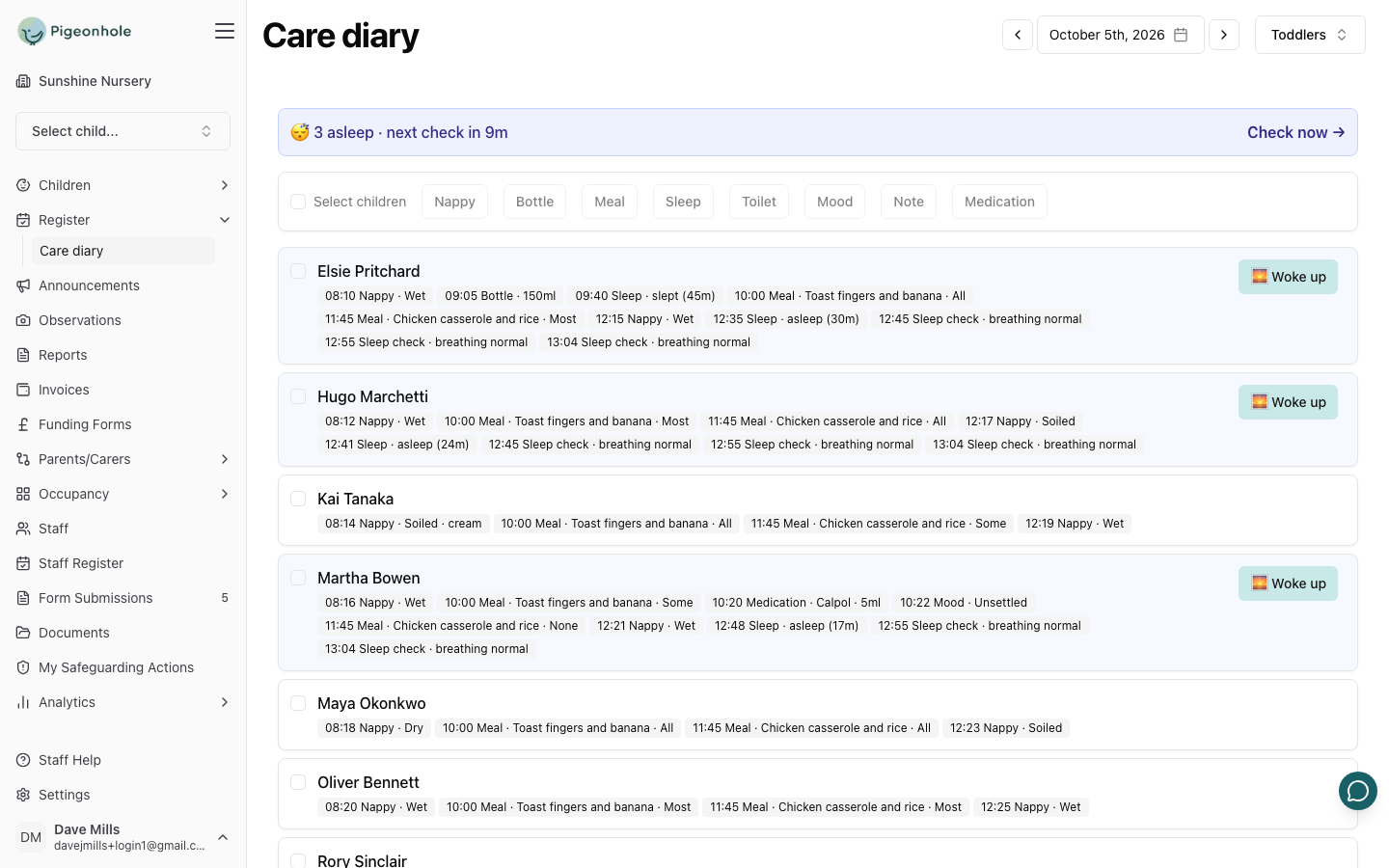
Tick the children, tap what happened, save — one entry for each of them. The room shows who's asleep and when the next sleep check is due, and families can see their child's day if you choose to share it.
Billing runs from each child's sessions, and every invoice flows straight into Xero or QuickBooks. Payments come back and mark themselves off.

Claims fill themselves in from the data you already hold and get checked before they go. Then, in your council's provider portal, our Chrome extension fills in the fields it recognises and puts every other figure one click away to copy. Where the council uses the LiquidLogic portal, it checks your claim against the live register too.

Something noticed at drop-off is logged in moments — factual, dated, and visible only to your safeguarding leads. Every action taken joins the chronology, so the whole story is in one place if Ofsted, or a safeguarding partnership, ever asks how it was handled.

Staff write it, you approve it, and it lands in every inbox — with the photos from today attached. No letter dies at the bottom of a book bag.

Funding, start to finish
Parental declarations are generated and signed digitally, headcounts come from the sessions you already run, and errors are caught before the council ever sees them. Then, in your council's provider portal, our Chrome extension fills in the fields it recognises and puts every other figure one click away to copy — so nobody types a child's details twice.
Declaration forms set up council by council · ask us to add yours

Optional, per setting
Each assist is a switch in your settings, and everything it writes stays a draft until a person approves it. Nothing reaches a family unchecked.
AI reads a child's whole term of observations, suggests where they are and what comes next, and drafts the family's summary. Your key person decides.
See howSay what you saw — AI drafts the observation in your setting's voice, with your writing rules applied.
See howAn application creates the child's record, and a page of health notes becomes a summary staff actually read.
See howAsk about your own setting in plain English — who's in, what's unpaid, what a policy says.
See how“The funding form feature is absolutely brilliant and that one feature alone has saved me a huge amount of time.”
“My team and families have all used it easily with no problems.”
No data migration project, no consultant. You can be running the same day you sign up.
1 · Guided
Rooms, staff, sessions and pricing — a guided setup walks you through it.
2 · From a spreadsheet
Drop in a spreadsheet from any system and AI maps the columns for you.
3 · Same day
Parents get their own portal for journals, invoices and forms.
Got questions? We've got answers. If you can't find what you're looking for, feel free to contact us.
18:00 — home time
A demo takes half an hour, on your data if you like. If it fits, you can be moved in the same week.
30-day free trial · no card needed to start
