
Regenerate Invoice
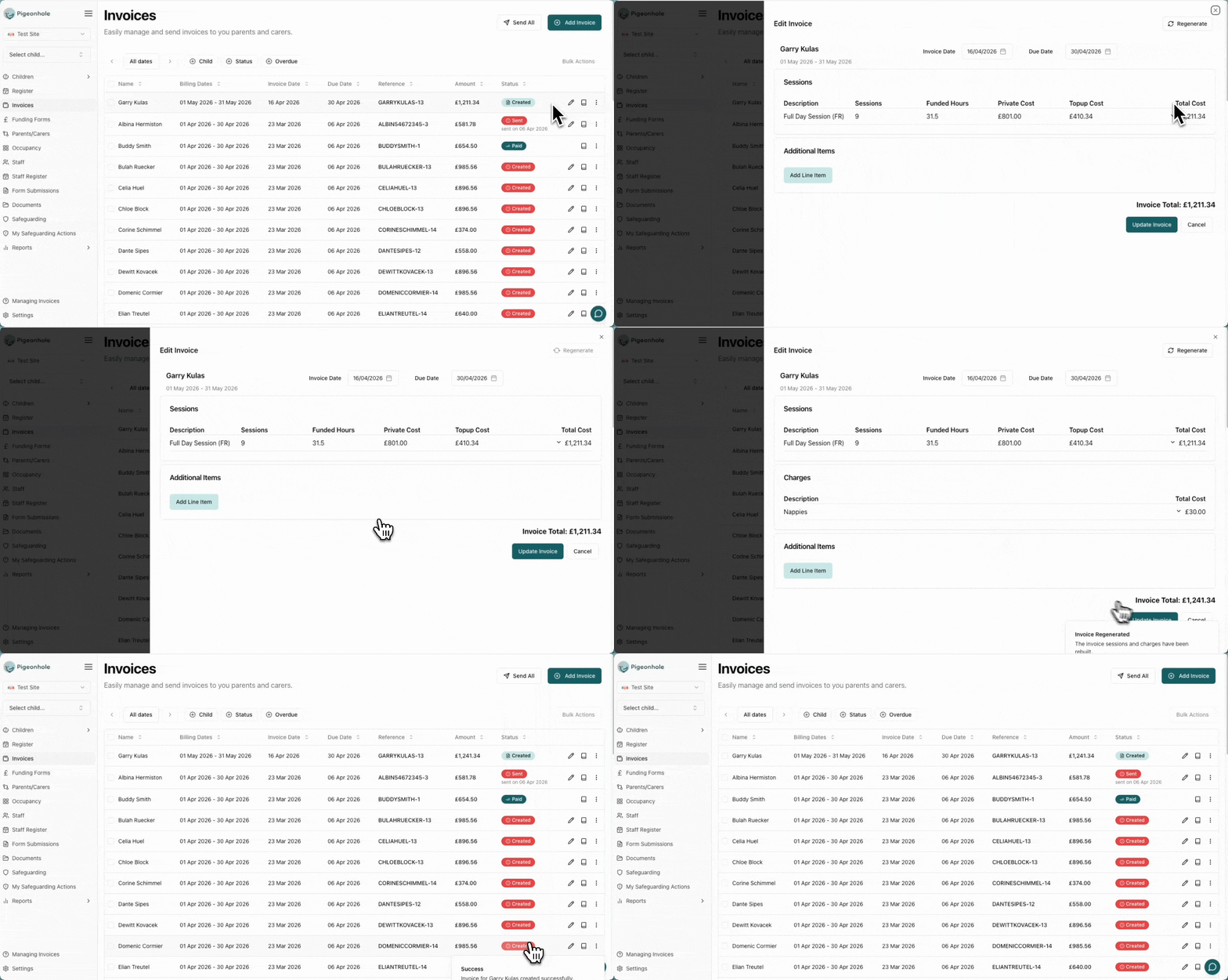
Rebuilds all session and charge line items from the child’s current schedule data. This is useful when a child’s sessions or charges have changed after the invoice was created. What it preserves:- Additional items added manually to the invoice
- All payment records
- The invoice reference number
- A child’s regular sessions were updated after the invoice was created
- Charges were added or removed from the child’s profile
- Session times or rates changed and the invoice needs to reflect the new data
- Open the invoice actions menu.
- Click Regenerate Invoice.
- The line items will be rebuilt from the child’s current schedule. Review the updated invoice to confirm the changes are correct.
Recreate Accounting Invoice
Clears the accounting integration link and triggers a fresh sync to your accounting software. This creates a new invoice in Xero, QuickBooks, or your connected platform.The Recreate Accounting Invoice action only appears on invoices that have failed to sync — that is, when you have an accounting integration enabled and the invoice is showing a sync error. It is not available on invoices that synced successfully.
- The invoice was deleted from your accounting software and needs to be recreated
- Persistent integration errors that cannot be resolved with a simple resync (see Integration Errors)
- Open the invoice actions menu on the erroring invoice.
- Click Recreate Accounting Invoice.
- Confirm the action — the existing accounting link will be removed and a new invoice will be created in your accounting software.