
Managing Term Dates and Holidays
This page will guide you through managing term dates and holidays in Pigeonhole. Term dates are used for creating invoices accurately for term time only children.Term Dates Overview
The Term Dates page provides a comprehensive list of all configured academic terms. From here, you can view existing terms, add new ones, or edit current entries.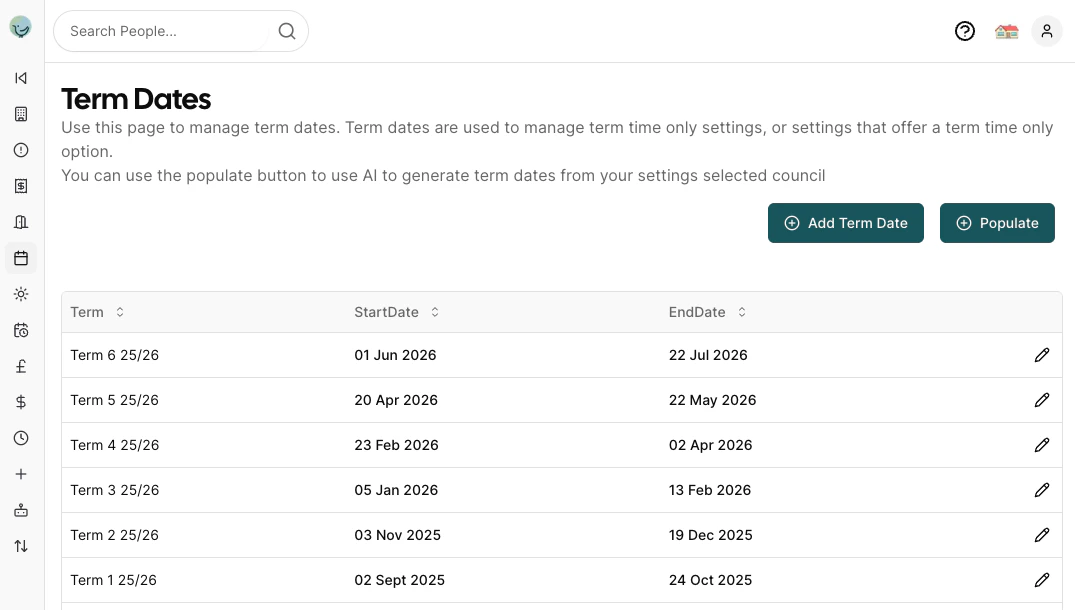
- Term: The identifier for the term, usually a combination of a term number and the academic year (e.g., “Term 6 25/26”).
- StartDate: The official start date of the term.
- EndDate: The official end date of the term.
Populating Term Dates Automatically
The ‘Populate’ button uses AI to automatically search the web and generate term dates based on your nursery’s selected council settings. Important: Always review and validate any AI-generated term dates to ensure accuracy and alignment with your specific council and nursery requirements.Adding or Editing a Term
When you click the “Add Term Date” button or the edit icon next to an existing term, a modal will appear, allowing you to input or modify the term’s details.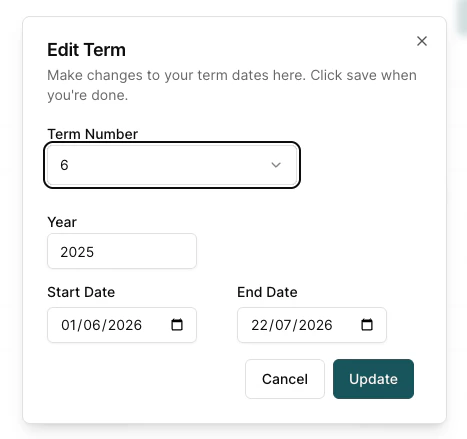
Term Fields
- Term Number: Select the specific term number from a dropdown list (e.g., 1 through 6).
- Year: Enter the academic year for the term (e.g., 2025). Years are always the start of the academic year, So for terms in the academic year 2025 - 2026, use 2025 as the year.
- Start Date: Use the date picker to select the start date of the term (dd/mm/yyyy).
- End Date: Use the date picker to select the end date of the term (dd/mm/yyyy).
Holidays Overview
The holidays page allows you to setup days when your setting is closed (e.g. for inset days or public holidays). For term time only settings this only needs to include days within term dates that you are closed (so you dont need to include things like xmas which are in the school holidays). Any days the setting is closed will not be invoiced for. The holidays add/edit dialog allows you to set up a holiday and add a start and an end date for that closure.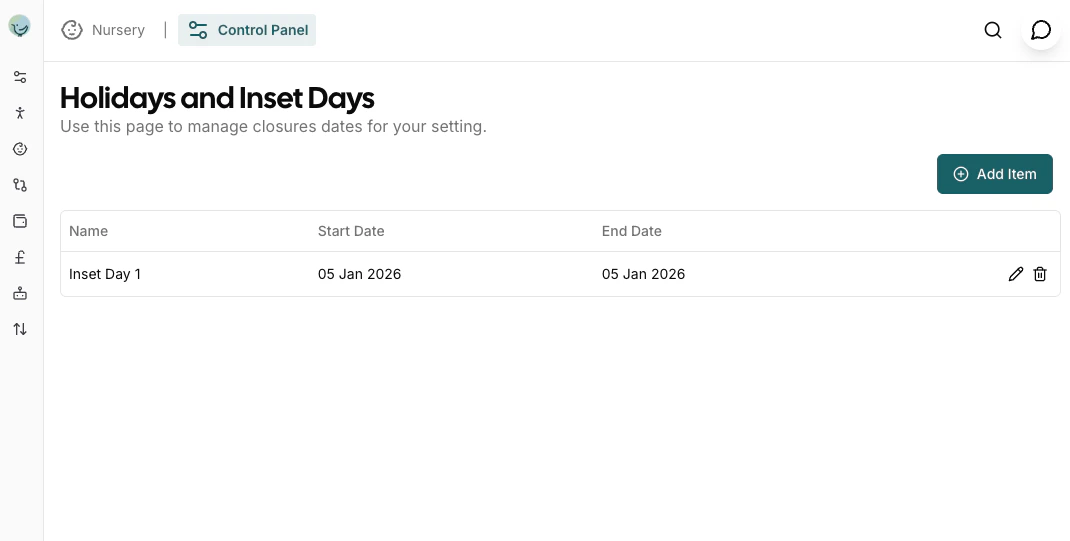
Holidays vs Term Dates: Holidays are days your setting is closed and are never invoiced. Term dates define the academic terms - they affect which days are invoiced for Term Time Only children. For all-year-round (stretched funding) children, term dates don’t affect invoicing but holidays still do.
Term Time Only vs All Year Round (Stretched)
Children can be set up as either Term Time Only or All Year Round (stretched funding):Term Time Only
- Child attends only during term dates
- Not invoiced for school holidays
- Funded hours are spread across term time only
- Set via the child’s attendance settings
All Year Round (51 Week / Stretched)
- Child attends throughout the year (except your closed days/holidays)
- Invoiced for all attended days including school holidays
- Funded hours are stretched across the full year
- Typically closed for Christmas week only
To set a child as Term Time Only, go to their profile > Attendance section and enable the Term Time Only setting. System-level term dates will then determine which days are invoiced for that child.
Frequently Asked Questions
Are holidays (nursery closed days) billable?
Are holidays (nursery closed days) billable?
No. Any days set as holidays in the system are days your nursery is closed. These days are never invoiced for any child, regardless of whether they are Term Time Only or All Year Round.
What's the difference between holidays and term dates?
What's the difference between holidays and term dates?
- Holidays: Days your nursery is closed. Never invoiced.
- Term Dates: Define academic terms. Only affect Term Time Only children (they’re not invoiced outside term dates).
How do I set up a 51-week (stretched funding) schedule?
How do I set up a 51-week (stretched funding) schedule?
For all-year-round attendance, simply leave the Term Time Only setting disabled on the child’s profile. They will be invoiced for all days except your configured holidays. If you’re typically closed for one week at Christmas, add that as a holiday period.
What if a parent doesn't want to book their funded days during school holidays?
What if a parent doesn't want to book their funded days during school holidays?
If a parent notifies you they won’t be using a scheduled session, you can mark it as a non-chargeable absence on the register. This ensures they aren’t invoiced for that day. See Using the Register for more details.
Can I have some children on term-time-only and others on stretched funding?
Can I have some children on term-time-only and others on stretched funding?
Yes. The Term Time Only setting is configured per child, so you can have a mix of attendance patterns in your nursery. System-level term dates and holidays apply to all children, but the Term Time Only setting determines how invoicing is calculated for each child.