
Understanding Error Panels
The Live Register Check displays results in three categorised tabs with helpful tooltips.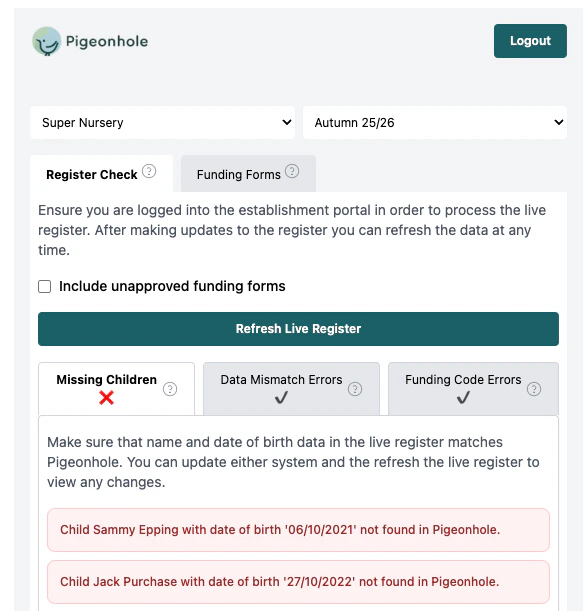
If there are no errors under each tab, you are good to go. You can submit your headcount in the portal, knowing that the data matches the data in Pigeonhole exactly.
Missing Children
What it shows: Children who appear in one system but not the other.- Red items: Children in Pigeonhole but missing from the live register
- Orange items: Children in the live register but not in Pigeonhole funding data
- Check if children should be added to or removed from either system
- Click on items with an eye icon to view full child details and copy them into the portal
Data Mismatch Errors
What it shows: Children who exist in both systems but with different information. Common mismatches:- Different funded hours between systems
- Mismatched funding days (Mon-Fri allocations)
- Discrepancies in funding codes or eligibility
- Review the specific mismatch details
- Update the incorrect system to match
Funding Code Errors
What it shows: Issues with extended hours codes and funding eligibility. Common issues:- Expired or invalid codes
- Parents who need to reapply for extended hours
- Use the Send Reminder button to notify parents about code issues
- Update codes against the funding form in Pigeonhole once received
Settings
Include Unapproved Funding Forms
This checkbox includes funding forms that have not been approved yet in the comparison with the live register. When to use:- Check this if you want to see all funding forms in your comparison. This can be useful as an early indication of any issues with forms, even before a parent has signed them.
- Uncheck this if you only want to compare approved, active funding.
Manual Upload Fallback
If auto-fetch fails, you can manually upload a CSV:- Download CSV manually from the establishment portal (usually under the “Reports” section)
- Upload file using the file input that appears after auto-fetch failure
- Process comparison as normal
Tips for Success
- Regular Checks: Run live register checks on a regular basis or before headcount submissions
- Parent Communication: Use reminder buttons for funding code issues