A termly review asks a key person to look back across a whole term of observations, which is a lot of reading. Prepare with AI does that reading and lays out what it found, with the evidence, so the key person can spend their time on the judgements rather than the searching. It never makes a decision for them.

What it reads

  • The child’s published observations from the term: their text, the areas they’re tagged with, and the next-step idea written on each.
  • Moments from home that staff accepted and linked to the curriculum, marked as shared by the family, so they can support a suggestion but never carry one on their own.
  • The child’s open next steps, and their levels on their last completed review.
  • Your setting’s level wording and term summary writing rules.
Photos and videos are never sent to the AI, and nor are drafts, unpublished observations or safeguarding records. Only this child’s observations are read; if a group observation’s text names another child, the AI is told to write only about this one.

What it suggests

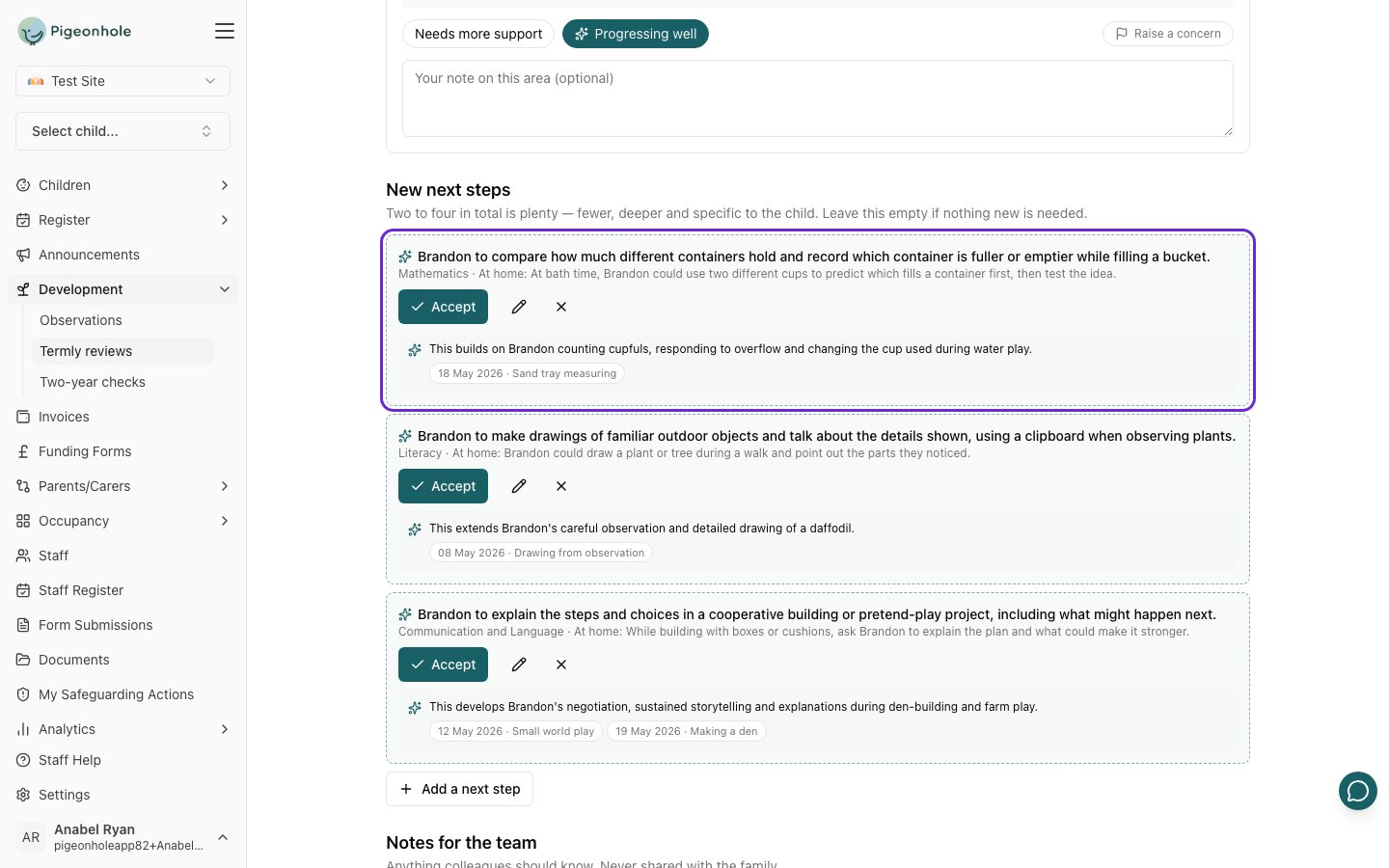
Three suggested next steps for Brandon, each with an idea for home, the reason and the observation it builds on
Click any cited observation to read it in a side panel without leaving the review.

What it never does

  • It never guesses. Where the observations give little or no evidence for an area, it says so and suggests no level. Areas with nothing recorded are flagged as something to look out for next term.
  • It never suggests a level or next step without evidence. Every suggestion must cite at least one real observation, or it’s left out.
  • It never marks a next step achieved. It says what the observations show; the key person decides.
  • It never overrides staff. Suggested levels are pre-selected, marked with a sparkle, so accepting one takes no clicks; but preparing again never changes a level a member of staff chose themselves.
  • It never shares anything. Nothing reaches a family until a member of staff publishes the term summary.
The AI’s suggestion is kept on record next to what staff chose, so you can always see where a judgement came from. That’s the kind of “checks and balances” Ofsted looks for when settings use AI.

Switching it off

Switch off AI preparation on the Termly reviews settings tab. Staff then complete reviews and write term summaries themselves; everything else works the same. See AI Features for every AI feature in Pigeonhole and how your data is handled.

Frequently Asked Questions

Is our data used to train the AI?

No. Your data is not used to train models and is never shared with another setting. See How your data is handled.

Why does it sometimes suggest a different level each time?

AI suggestions can vary a little between runs, especially where the evidence is borderline. That’s one reason the key person always makes the final judgement. If a suggestion doesn’t fit, choose the level that does.

Why is Prepare with AI greyed out?

The child has no published observations this term, so there’s nothing for it to read. Hover over the button to see why. The review can still be completed by hand.