Every funding form ends the same way: it is signed by each parent with parental responsibility, submitted for approval, and then approved and signed off by you. The only thing that changes is how the signature is captured.
There are three ways to do this, so no family is left unable to complete a form.
The three routes
Choosing a route
Send to parents is the default and needs the least work from you. The parent gets an email with a link, completes their section, signs, and submits it back for approval. It only works if the parent has been invited and has logged into Pigeonhole at least once.
Print and upload and Sign in the office are both manual forms — the same form type, just finished differently. A manual form will accept either an uploaded signed document or signatures captured on screen, so you are never locked into the one you started with. If you printed a form and the parent then turns up in person, you can simply have them sign on screen instead.
Switching between routes
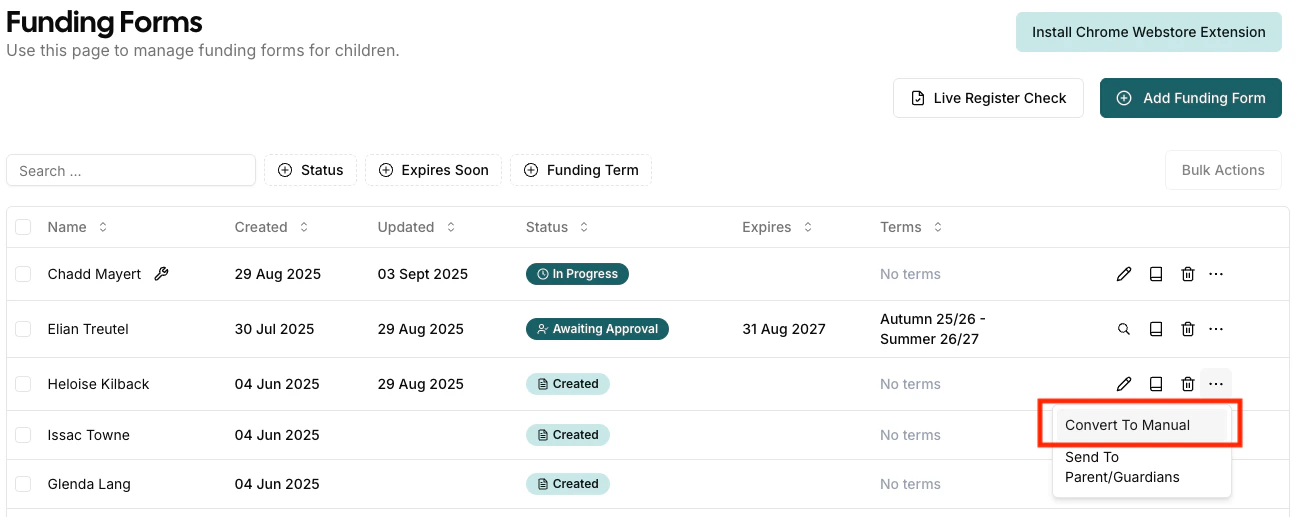
You are not committed to your first choice. Any form can be switched between online and manual at any point before it is approved, using Convert To Manual / Convert To Online in the More Actions (…) menu on the funding forms list.
This means a form you already sent to a parent can be finished in person if they come into the office, and a manual form can be handed back to a parent to finish themselves.
While a form is manual and not yet approved, it is hidden from the parent’s own portal. If a parent later wants to complete it themselves, convert it back to online first. Once approved, the form is visible to them again.
Manual forms don’t send the automatic “submitted” and “approved” emails that online forms do, since you are completing the form alongside the parent. Let the parent know the outcome yourself if they need confirmation.
Frequently asked questions
Does the parent need a Pigeonhole account to sign?
Only for the online route. Both manual routes — printing the form, and signing on your device — work for a parent with no account, no email address and no invite.
Which parents have to sign?
Every parent marked Has Parental Responsibility on the child’s record. If the wrong people are being asked to sign, check that flag on the child’s contacts. Both parents can sign in the same sitting, on the same screen or under one parent’s login.
Can I start one way and finish another?
Yes. A manual form accepts either an upload or on-screen signatures, and you can convert between online and manual at any time before approval.