
Step 1: Open it from the From families card
A leaver is about the setting rather than one room, so the option lives on the From families card: click Adjust, then choose the room, then the Schedule Leaver tab.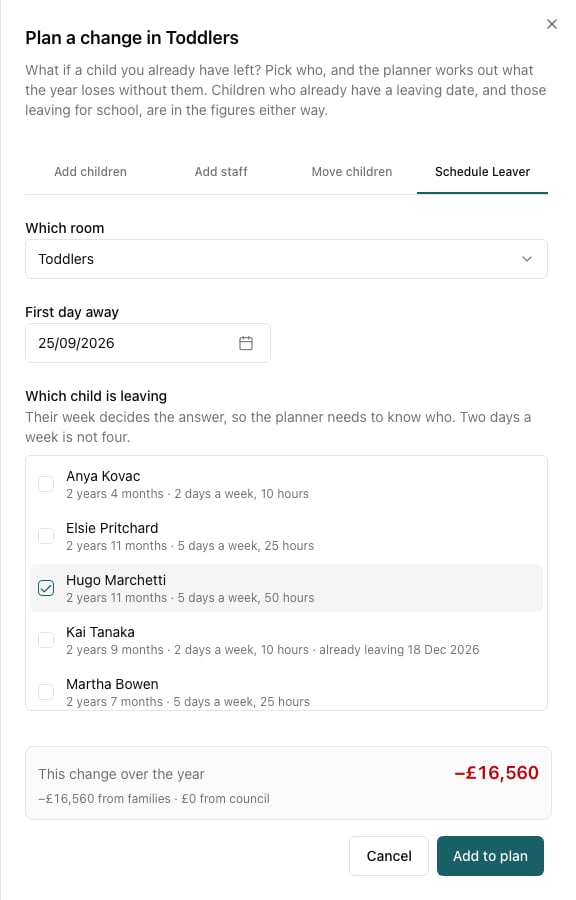
If your setting has no rooms, the Schedule Leaver tab is on every change sheet, because there is only one place a child can be.
Step 2: Pick the child, not a number
The planner asks which child, not how many — because their week decides the answer. The list shows each child’s age, how many days a week they come and how many hours, so you can tell a five-day full-timer from a two-morning child at a glance. Set First day away to the date they would stop coming.Step 3: Read what it costs
In this example, losing one full-time toddler — five days a week, 50 hours — costs £16,560 over the year, all of it from families. Compare that with the two-day child two rows above, worth a fraction of it. “A child leaving” is not one number; it is between about £900 and £22,000 depending on who leaves.Step 4: Use it to answer the real question
The figure on its own is only half the value. The useful moves:- Would keeping them be worth a discount? If a family is leaving over cost, you now know what the place is worth to you over the year, and what you could sensibly offer against it.
- Could you refill the place? Add the leaver and a planned child from your waiting list in the same plan. If the replacement is worth more than the leaver, the plan’s total goes up, and you have your answer.
- Does the room still need the same staff? Losing a child rarely lets you cut a shift, but losing three might. The room’s free places go up as soon as the leaver is in the plan.
- What if several go? Tick more than one child, or add several leaver changes, and see the total. This is the honest way to stress-test a year: plan the three families you are least sure about all leaving, and see whether the year still works.
Step 5: Keep it, don’t act on it
Nothing here changes the child’s record. If the family does give notice, set their real leaving date on their profile — and then take the planned leaver back out of your plan, or it will be counted twice. Save the plan if it is a conversation you’ll come back to: “If the Marchettis go in April”.Things worth knowing
- The figure is measured at your saved prices, so a leaver you plan alongside a price rise is costed at the price they were actually paying — the two changes don’t double-count.
- Council income usually doesn’t move for an under-three with no funded hours; for a three-year-old with 30 funded hours it is most of the loss. The split under the figure shows which.
- A leaver frees places for the rest of the year, so a leaver in December and a starter in January can net out to almost nothing. Plan both and read the total, not the two figures separately.